

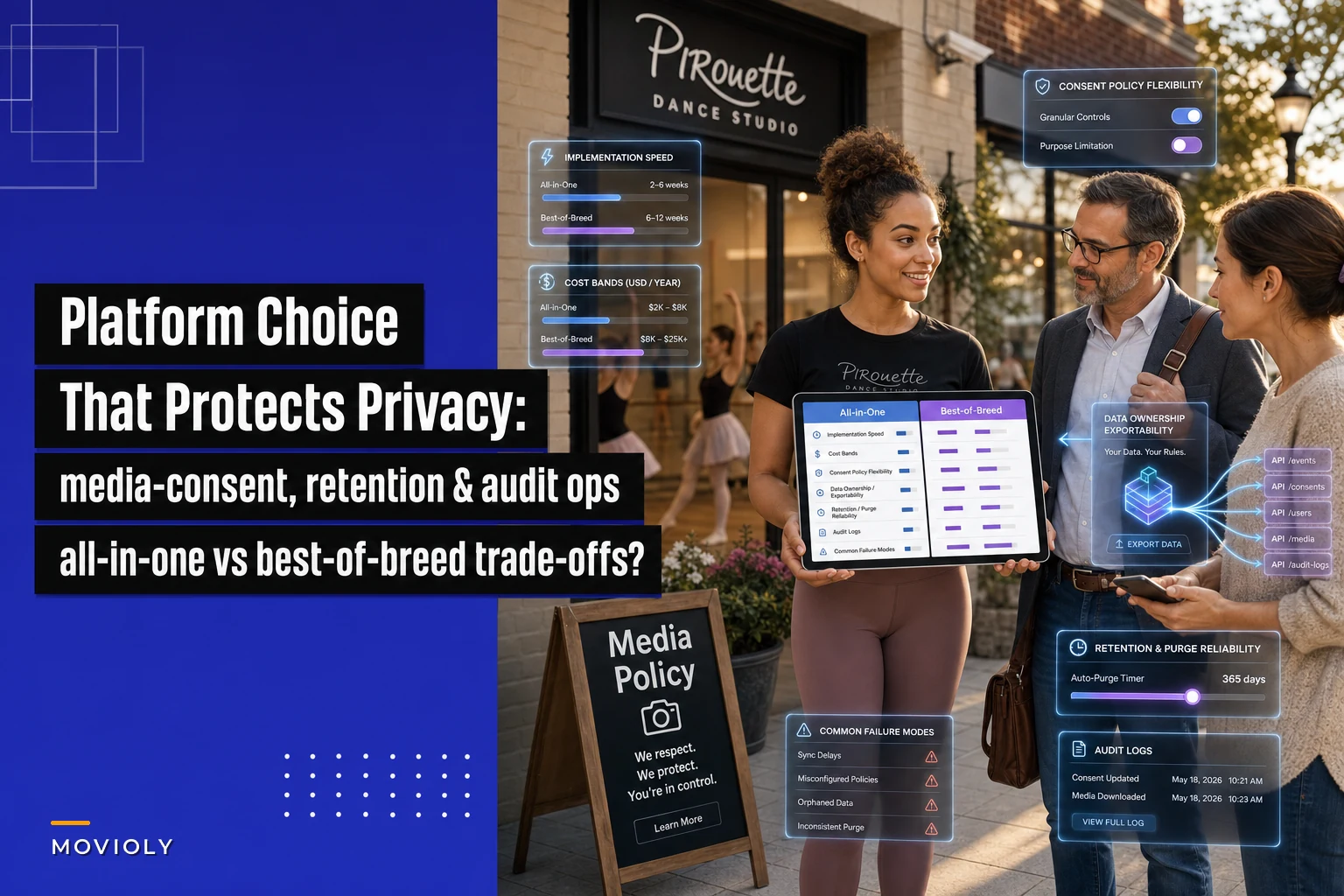

Most studio owners pick software based on scheduling, billing, and how easy the parent app is to navigate. Consent handling almost never makes the shortlist. Then two years later a parent emails asking you to delete every photo of their kid, and you realize your "system" is actually four systems that don't talk to each other — and none of them can prove what was collected, when, or who touched it.
That gap is exactly why platform architecture matters here. The choice between an all-in-one studio system and a best-of-breed stack quietly decides how hard it'll be to honor a consent withdrawal, prove compliance during a dispute, or hand a family a clean copy of their own data. This isn't about which platform is "better." It's about which one matches how you actually handle media and records.
If you haven't already built the underlying policies — the templates, retention schedules, and audit expectations — do that first. This article assumes you have those in place (or are working through something like our guide on practical media-consent templates, retention schedules and audit checklist) and now need to figure out what kind of software architecture actually enforces them.
The core difference nobody explains clearly
An all-in-one studio system keeps enrollment, billing, attendance, and often media/photo storage under one login and one database. A best-of-breed stack means you deliberately choose the best individual tool for each job — one platform for scheduling, a separate photo-sharing app, a dedicated email tool, maybe a cloud drive for recital videos — and stitch them together.
For consent specifically, the divide comes down to one question: when a consent decision changes, how many places do you have to go to enforce it?
With an all-in-one, ideally the answer is one. A parent revokes photo consent, you update a flag on their child's profile, and the system knows not to include that kid in the shared gallery. With a best-of-breed stack, the answer is however many tools currently hold that child's photos — and each one needs to be checked, updated, or purged separately.
That's the real tradeoff. Not features. Not price. Enforcement surface area.
Where each architecture wins and loses
Here's an honest breakdown across the five things that actually matter for consent and privacy compliance.
Eliminate scheduling headaches and missed payments.
Movioly streamlines booking, confirming, and managing every class with ease.
- Unified class and instructor scheduling
- Automated student notifications
- Integrated payment tracking
No credit card required
| Capability | All-in-One Studio System | Best-of-Breed Stack |
|---|---|---|
| Consent capture | Consent tied directly to the student record; hard to lose | Often captured in a separate form tool; must be linked manually to the right profile |
| Retention schedules | Can enforce one schedule across records | Every tool has its own retention default (some keep data forever) |
| Secure purge | One purge action can cover most data | Must purge in each system; easy to miss a backup or an old app |
| Audit trails | Usually a unified activity log | Fragmented logs; may need to pull from 4+ tools to reconstruct events |
| Data portability | Export is centralized, sometimes limited to their format | Export is per-tool; more work but sometimes more flexible |
The pattern is pretty clear. All-in-one systems win on enforcement and traceability. Best-of-breed stacks win on flexibility and avoiding vendor lock-in — but only if you're disciplined enough to manage the extra moving parts.
The mistake studios make is assuming best-of-breed automatically means "more control." It's more control if you actively manage it. If you don't, it's just more places for a child's photo to quietly live forever.
The hidden failure mode: orphaned media
The most common consent problem in real studio operations isn't a dramatic breach. It's boring. A photo of a kid ends up somewhere the consent record doesn't reach.
A typical scenario looks like this: a studio uses an all-in-one for enrollment and billing, but recital videos go to a shared Google Drive, competition photos live in a WhatsApp group with 40 parents, and the marketing person keeps a folder of "best shots" on their laptop for the website.
The parent who revokes consent gets removed from the enrollment system's gallery in a couple of minutes. Meanwhile their kid is still in the WhatsApp group's shared album, still in a few website blog posts, and still in the marketing person's laptop folder. On paper, consent was honored. In practice, the media is scattered across places nobody is tracking.
This happens with both architectures — but best-of-breed makes it far more likely because the extra tools accumulate informally. Someone adds a new app to solve a problem, and nobody updates the consent map.
When an all-in-one actually makes sense
Go with a unified studio system if most of these describe you:
-
You have limited or no in-house tech skill and don't want to manage integrations
-
Media consent and privacy are a real concern (children, published recital footage, competition photos)
-
You want a single audit trail you can pull up without technical help
-
Your staff turns over and you can't rely on people remembering which tool has what
-
You'd rather accept some feature limits in exchange for fewer places things can break
For most small studios — especially single-location ones with one or two admins — this is the safer default for consent purposes specifically. The whole value is that consent, retention, and purge live next to the student record instead of scattered across apps.
When best-of-breed is the right call
A best-of-breed stack earns its place when:
-
You have someone — staff or contractor — who genuinely maintains integrations and reviews them regularly
-
Your all-in-one option is weak in a critical area, like clunky photo handling with no consent flags
-
You're multi-site and need specialized tools a single platform can't match
-
You want to avoid being locked into one vendor's export format and pricing
The key word is maintains. Best-of-breed without ongoing maintenance isn't a strategy — it's a slow accumulation of privacy liabilities. If your honest answer to "who checks that all these tools respect the same consent decision?" is "nobody, really," you shouldn't be running a stack.
Who should NOT run a best-of-breed stack
Skip it entirely if:
-
You're a solo owner already stretched thin on admin
-
Nobody on your team can confidently explain where every piece of student media currently lives
-
You've added tools reactively over the years without ever removing old ones
-
You can't produce, today, a list of every place a child's photo might exist
If more than one of those is true, adding more independent tools will make a future consent request harder, not easier.
A vendor-agnostic evaluation checklist
Whatever direction you lean, run any platform — or combination — through these questions before signing. This works for a single all-in-one or for each tool in a stack:
-
Consent capture Can consent be attached directly to a student record, with a date and version? Can it store different consent levels (internal use only vs. website vs. social)?
-
Consent changes When a parent revokes, does the system flag it in a way that actually blocks future use — or does it just record the request?
-
Retention Can you set a retention period and have data auto-flag or auto-delete at the end? What's the default if you set nothing?
-
Secure purge When you delete, is it truly gone — including from backups within a stated window? Ask them to put the backup timeline in writing.
-
Audit trail Can you see who viewed, exported, or changed a record, and when? Can you export that log?
-
Data portability Can a family get a copy of their own data in a readable format? Can you export everything if you leave the vendor?
-
Media specifically Does photo/video storage respect the same consent flags as the rest of the system, or is it a separate silo?
That last question exposes more problems than any other. Plenty of all-in-ones handle consent beautifully for text records and then dump all photos into a generic gallery with zero consent awareness. Ask to see it demonstrated, not described.
A realistic scenario with numbers
A two-location studio with roughly 260 students was running a best-of-breed setup: one platform for scheduling and billing, a separate photo app for parent galleries, email marketing in a third tool, and recital footage on a shared drive.
A family requested full deletion after a custody situation. The admin honored it in the main system quickly. But reconstructing everywhere the child appeared took about 11 hours spread across a week — digging through the photo app, the drive, old email campaigns with embedded images, and two years of Instagram posts. They found the child in six places outside the main system. Two were only caught because a longtime instructor happened to remember them.
After that, they consolidated media into a single system with consent flags and cut their informal tools down to one shared drive with a strict monthly review. The next deletion request took under 30 minutes and was fully documented. Revenue didn't change — but their exposure did, dramatically. That's the real return here: not efficiency, but the difference between "we think we handled it" and "we can prove we handled it."
Migration safeguards (so you don't create new gaps)
Switching architectures is exactly when consent data gets lost or duplicated. A few safeguards that consistently prevent problems:
-
Map every location first. Before moving anything, list every place student media and consent records currently live — including informal ones like phones, laptops, and group chats.
-
Migrate consent records, not just contacts. It's easy to move names and emails and leave consent flags behind. Confirm consent status transfers with each record.
-
Freeze, then verify, then purge. Don't delete from the old system until you've confirmed the new one has everything correct. Then purge the old system fully — don't leave it running "just in case."
-
Match retention schedules on both sides. If the old tool auto-kept everything and the new one purges at two years, decide deliberately what happens to older records rather than letting defaults collide.
-
Test one revocation end-to-end. Before going live, run a fake consent withdrawal through the new setup and confirm it actually blocks future use everywhere.
A visual of the migration steps makes gaps obvious.
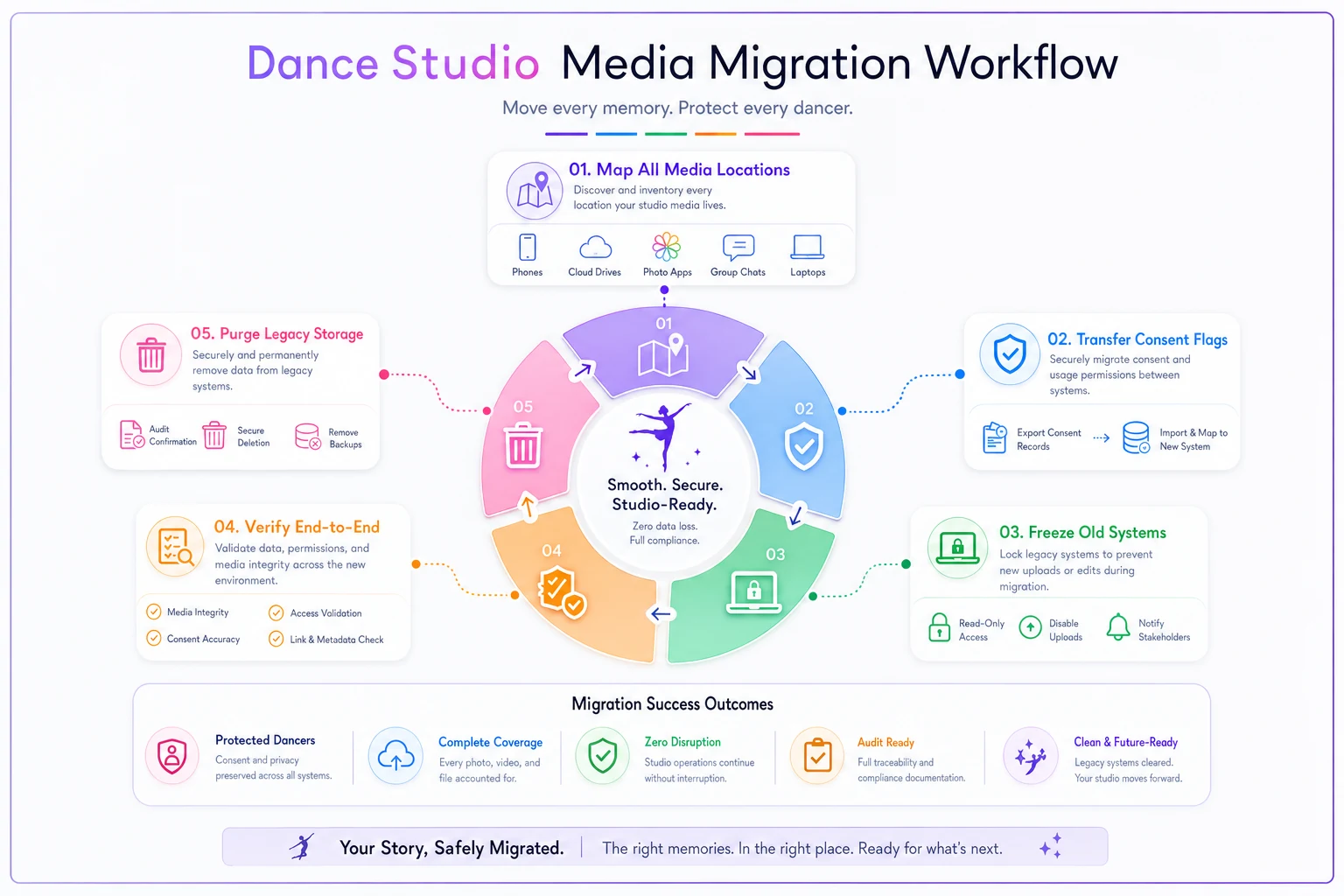
That fifth step catches the most issues. If a test revocation doesn't cleanly propagate, you've found the problem before a real parent does.
Quick wins if you're not ready to switch anything
You don't need a migration to reduce risk this month:
-
Kill the informal media stores. Get recital videos, competition photos, and marketing folders off personal devices and into one controlled location. This single move eliminates most orphaned-media risk.
-
Write a one-page media map. Document every place student media lives right now. If it takes more than a page, that's your warning sign.
-
Add a consent column wherever your students are listed, even if it's temporary. Knowing at a glance who's opted out prevents most accidental use.
-
Set a quarterly purge reminder to actually delete what's past its retention window instead of letting it pile up.
Kill the informal media stores.
This single move eliminates most orphaned-media risk.
The bottom line for your decision
The consent question doesn't reward the fanciest platform. It rewards the one with the smallest gap between a parent's decision and what your systems actually do about it.
For most small studios, an all-in-one keeps that gap narrow because consent, retention, and media live in one place with one audit trail. Best-of-breed can work — sometimes better — but only when someone is genuinely responsible for keeping every tool honoring the same rules. If nobody owns that job, fewer tools is the safer answer.
Whichever way you go, the software only enforces the policy you've defined. The architecture decides how reliably it gets enforced, but the retention schedules, consent levels, and audit expectations have to come from you first — and that's the part worth getting right before you shop for anything.
The consent question doesn't reward the fanciest platform. It rewards the one with the smallest gap between a parent's decision and what your systems actually do about it.
For most small studios, an all-in-one keeps that gap narrow because consent, retention, and media live in one place with one audit trail. Best-of-breed can work — sometimes better — but only when someone is genuinely responsible for keeping every tool honoring the same rules. If nobody owns that job, fewer tools is the safer answer.
Whichever way you go, the software only enforces the policy you've defined. The architecture decides how reliably it gets enforced, but the retention schedules, consent levels, and audit expectations have to come from you first — and that's the part worth getting right before you shop for anything.
Ready to elevate your studio operations?
Join 500+ studios using Movioly to save time, reduce admin workload, and enhance student experiences.