

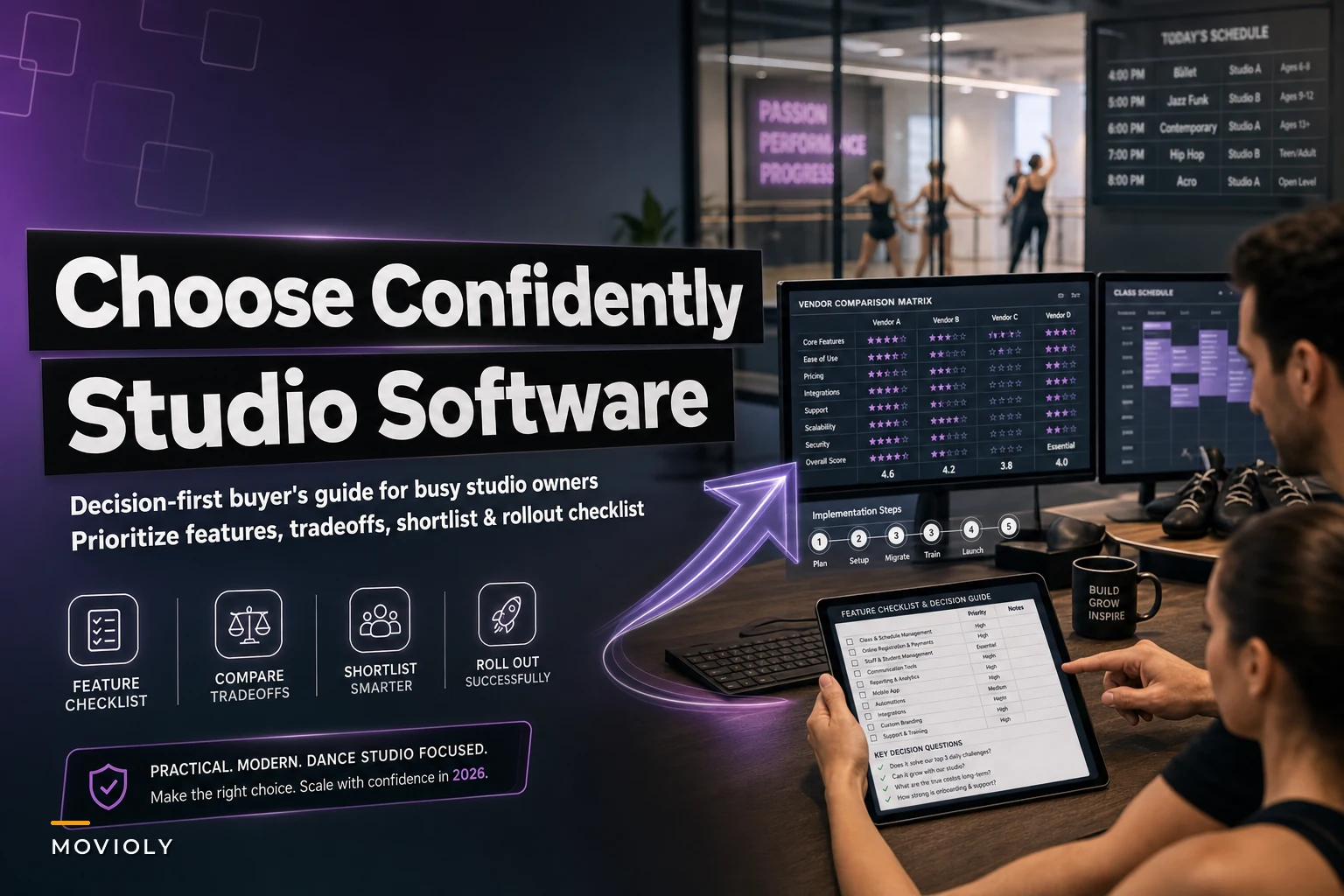

Most studio owners don't buy software because they want software. They buy it because something broke. A season's registrations lived in a spreadsheet that someone overwrote. Three families got double-charged. The front desk spent four hours reconciling who actually showed up to Tuesday's ballet class. By the time you're seriously shopping, you've usually already outgrown whatever got you here.
This guide is built for that moment — when you know you need to switch or upgrade, and you want to make the call without regretting it eighteen months from now. We'll cover the categories of software, a feature checklist you can actually prioritize, a shortlist of real vendor types with honest tradeoffs, a comparison matrix, and a migration plan that won't blow up your enrollment season.
First, Understand What You're Actually Buying
"Dance studio software" is a loose umbrella. Under it sit several distinct functions, and the biggest buying mistakes happen when owners assume one product does all of them well. It almost never does.
-
Scheduling — class calendars, room and studio assignments, instructor availability, recurring sessions, and conflict detection. This is the engine. If it's weak, everything downstream suffers.
-
Registration & payments — enrollment flows, tuition billing, autopay, recital fees, late-cancel charges, and refunds. This is where money leaks or gets stuck.
-
CRM — the record of every family
contact info, communication history, trial status, retention flags. Underrated and usually the first thing owners neglect.
-
POS — retail sales (shoes, tights, merch), drop-in payments, gift cards. Smaller studios skip this; studios with a shop can't.
-
Payroll / staffing integrations — tying instructor hours, substitute pay, and class loads into something your bookkeeper can use without rebuilding it by hand.
The real question isn't "which product has all five?" It's "which product nails the two or three that are actually costing me money right now, and plays nicely with the rest?"
The Prioritized Feature Checklist
Not every feature deserves equal weight. Based on how studios actually use these systems day to day, features cluster into three tiers. Treat tier 1 as deal-breakers, tier 2 as strong preferences, and tier 3 as nice extras you shouldn't pay a premium for.
Eliminate scheduling headaches and missed payments.
Movioly streamlines booking, confirming, and managing every class with ease.
- Unified class and instructor scheduling
- Automated student notifications
- Integrated payment tracking
No credit card required
Tier 1 — Non-negotiable
-
Recurring class scheduling with room and instructor conflict detection
-
Family accounts (one login, multiple dancers, multiple cards)
-
Automated recurring tuition billing with failed-payment handling
-
Attendance tracking tied to the actual roster
-
Clean data export (CSV at minimum) — you want to be able to leave
-
Role-based staff permissions (your Saturday desk person shouldn't see payroll)
Tier 2 — Strongly preferred
-
Trial and prospect tracking that doesn't require a separate tool
-
Waitlist automation for full classes
-
Two-way messaging (email + SMS) with history attached to the family record
-
Reporting on enrollment, revenue, and retention by program
-
Recital/costume fee handling as a separate billing line
-
Substitute and instructor-swap workflows
Tier 3 — Nice to have
-
Native mobile app (a good mobile-responsive site often matters more)
-
Built-in POS for retail
-
Gift cards and account credits
-
Public class-discovery marketplace listing
One pattern worth flagging: owners routinely over-index on the mobile app and under-index on data export and failed-payment handling. The app is what looks good in the demo. The billing recovery and export quality are what you feel at 11pm during registration week.
A Quick Word on AI in These Platforms
A lot of vendors are now stapling "AI" onto their marketing. Most of it is noise. The places where AI automation genuinely earns its keep in a studio are narrow and practical: flagging dancers whose attendance is quietly dropping before they churn, surfacing families with an expiring card before the payment fails, auto-drafting the routine "class is full, here's the waitlist" messages, and reconciling attendance against the roster so your desk staff isn't doing it manually. That's it.
If a platform's AI claims go beyond reducing repetitive admin work and catching things humans miss, be skeptical. Useful automation is boring and saves hours — it doesn't need a buzzword.
Vendor Shortlist with Honest Pros and Cons
These are archetypes you'll encounter while shopping. The categories matter more than chasing a specific brand, because feature sets shift every year.
1. The established all-in-one (large, class-based) Pros: Deep feature set, mature billing, strong for multi-program studios running ballet, hip-hop, and competition teams under one roof. Cons: Can feel bloated, pricier, and the interface often shows its age. Overkill for a 120-student studio.
2. The modern all-in-one (sleek, newer) Pros: Clean UI, good mobile experience, solid trial-to-enrollment flow, often strong at communication and automation. Cons: Reporting can be shallow, and some are still filling gaps in recital and costume billing.
3. The scheduling-first platform Pros: Excellent calendars, waitlists, and instructor management. Great if scheduling complexity is your real pain. Cons: Payments and CRM are often bolt-ons rather than first-class features.
4. The payments-first platform Pros: Rock-solid autopay, failed-card recovery, and financial reporting. Cons: Scheduling and attendance can feel secondary; you may need to pair it with something else.
5. The low-cost generalist (fitness/booking tools) Pros: Cheap, fast to set up, fine for a single-location studio with simple needs. Cons: Not built for the recital-season, costume-fee, multi-dancer-family reality of dance. You'll hit walls.
6. The spreadsheet + Stripe + email stack Pros: Nearly free, fully flexible. Cons: Everything is manual, nothing talks to anything, and it breaks the moment you pass around 80 students. This is what you're trying to leave.
7. The vertical studio platform (dance-specific) Pros: Speaks your language — levels, progressions, recitals, competition teams. Less configuration because it's built for your use case. Cons: Smaller ecosystem, fewer third-party integrations.
8. The operational platform with AI-assisted admin Pros: Centralizes scheduling, billing, and communication, and leans on automation to cut the repetitive desk work — failed-payment nudges, attendance reconciliation, retention flags. Good fit for owners who want fewer tools and less manual reconciliation. Cons: Newer category, so you'll want to confirm the integrations you depend on are supported.
Comparison Matrix
When you line these up side by side, the differences get a lot clearer — especially once you anchor each row to your actual problem, not what looks impressive in a demo. Studios with chronic payment failures should be reading the payments-first and AI-assisted rows before anything else. Studios drowning in scheduling conflicts should start at row three.
| Type | Core strength | Pricing model | Best for studio size |
|---|---|---|---|
| Established all-in-one | Depth, mature billing | Monthly + per-student tiers | Large / multi-program |
| Modern all-in-one | UX, communication, trials | Flat monthly tiers | Small–mid, growing |
| Scheduling-first | Calendars, waitlists | Monthly, often per-location | Mid, scheduling-heavy |
| Payments-first | Autopay, recovery, reporting | % of transactions + base | Any, finance-focused |
| Low-cost generalist | Price, simplicity | Low flat monthly | Single location, simple |
| Spreadsheet + Stripe | Flexibility, near-free | Transaction fees only | Under ~80 students |
| Vertical dance platform | Dance-specific workflows | Monthly tiers | Dance-focused, any size |
| AI-assisted operational | Centralization + automation | Monthly tiers | Owners cutting admin load |
Read this matrix against your actual pain, not your aspirations. The matrix won't tell you which to pick — your weekly time losses will.
A Real Scenario
A two-location studio with about 310 students was running a scheduling tool, Stripe on the side, and a general email platform — three systems, none connected. The front desk was spending roughly 10–12 hours a week reconciling attendance, chasing failed cards, and copying family info between tools. Failed payments were slipping through; they were quietly losing somewhere around $1,400–$1,800 a month in tuition that never got recovered because nobody had time to follow up.
They consolidated onto a single platform with automated failed-payment retries and attendance tied directly to the roster. Within two billing cycles, recovered payments had covered the software cost several times over. Desk hours dropped to around 3–4 a week — not zero, but enough that the manager stopped doing reconciliation on Sundays. Enrollment didn't move much. The win was purely operational: less leakage, fewer hours, fewer mistakes.
That's the realistic outcome to expect. Software doesn't grow your studio. It stops the slow bleed and gives your time back.
When a Switch Actually Makes Sense
Timing and context matter here. Switching when your pain is genuinely tool-related is smart. Switching because a vendor gave you a good demo is how you end up doing the whole migration again in 18 months.
Signs the switch is worth it:
-
You're manually reconciling payments or attendance more than a few hours a week
-
Failed cards are going uncollected because nobody follows up
-
Your current tool can't handle recital fees, costume billing, or multi-dancer families cleanly
-
You've passed roughly 80–100 students on a spreadsheet stack
-
Staff can't pull the reports you need to make staffing or pricing calls
And the flip side — when switching is actually a bad idea:
-
You're in the middle of registration or recital season — wait for a lull
-
Your pain is a process problem, not a tool problem (bad data entry follows you to any system)
-
You haven't exported and cleaned your current data yet
-
You're chasing a shiny feature you'll use twice a year
Timing and context matter here.
Migration and Implementation Checklist
Switching platforms mid-season is how studios lose data and trust. Run it like a project, not an impulse. The steps below aren't optional — skipping any one of them tends to surface as a problem two billing cycles later when a parent calls confused about their account.
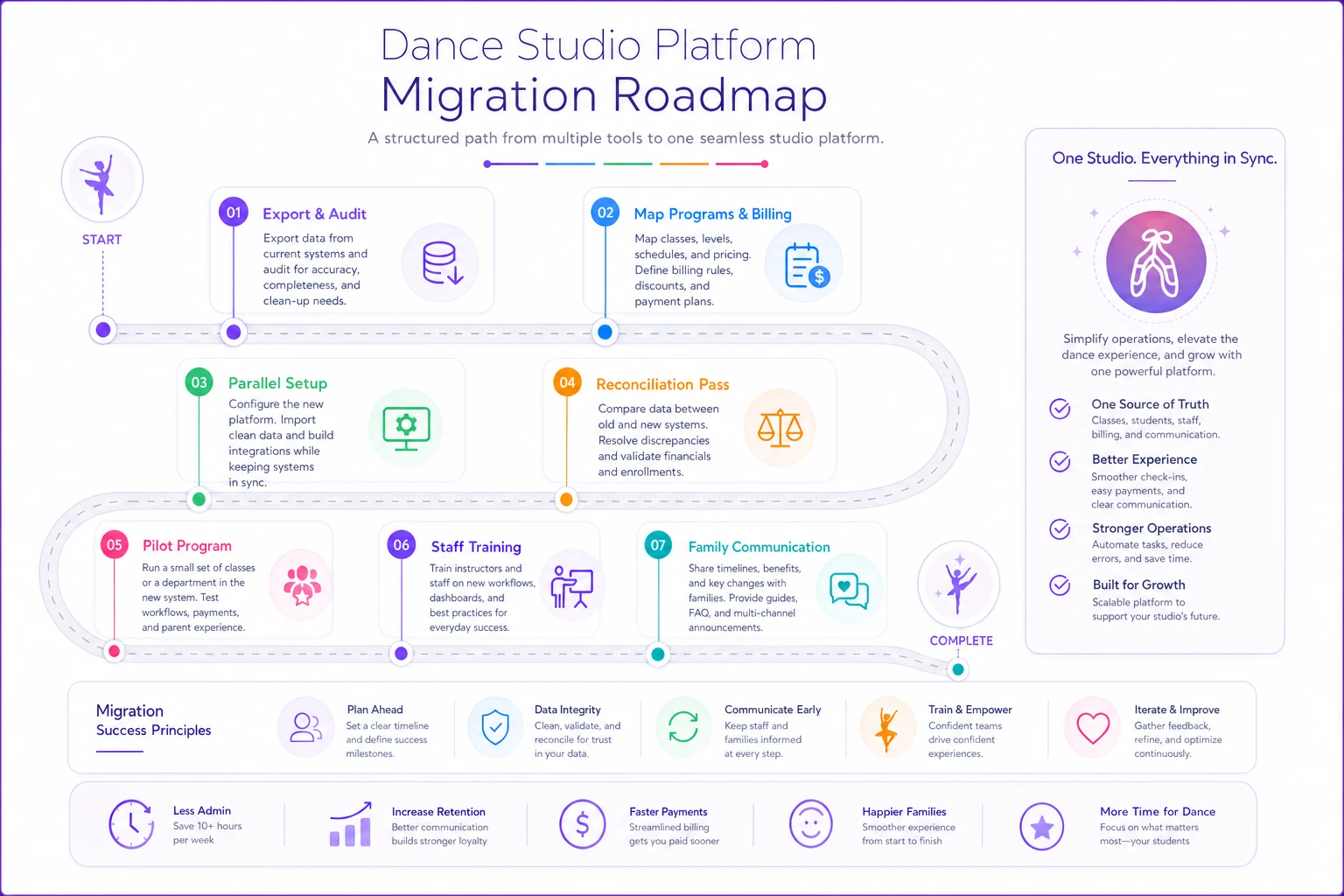
Below is a simple migration workflow visualization.
-
Export and audit your current data. Pull families, dancers, class rosters, payment history, and account credits. Deduplicate families and fix obvious errors before import — garbage in, garbage out.
-
Map your programs and billing. Document every tuition tier, recital fee, sibling discount, and autopay rule. This is where most migrations break.
-
Set up in parallel. Build the new system while the old one still runs. Don't cut over cold.
-
Run a reconciliation pass. Confirm total enrolled students and total monthly billing match between old and new. Numbers should tie out to the dollar.
-
Pilot with one program. Move one class or location first, watch for billing and attendance errors, then expand.
-
Train staff on the two workflows they use daily — not every feature. Desk check-in and billing adjustments cover 90% of real use.
-
Communicate to families early. New login, new autopay confirmation, and a clear date. Expect a wave of questions in the first week.
-
Keep the old system read-only for 90 days. You will need to look something up. Guaranteed.
The reconciliation pass in step 4 is the one owners skip and regret. If your student count or billing total doesn't match after import, you have a problem you want to find now — not when a parent calls about being double-charged.
ROI and Cost Considerations
Price tags are the easy part. The real cost is total cost of ownership over a year or two. Before you make any final decision, map out what you're actually spending — and what you're quietly losing.
Factor in:
-
Base subscription — usually $50–$300+/month depending on size and tier
-
Per-student or per-location fees — these scale, sometimes painfully
-
Payment processing — often 2.5–3.5% plus per-transaction; on a studio doing real volume this can dwarf the subscription cost
-
Migration time — staff hours to move and clean data
-
Training time — a real cost even if the vendor "includes" it
On the return side, the gains that actually show up are: recovered failed payments, reduced admin hours, fewer billing errors, and better retention from catching at-risk families earlier. The payment recovery alone often justifies the switch — losing even 1–2% of monthly tuition to uncollected failed cards adds up fast over a full year.
Staffing costs interact with your software choice too. If you're using scheduling and attendance data to make hiring and class-opening decisions, the quality of that reporting matters more than it looks on a demo. We've written separately about how to adjust staffing, schedules, and pricing when the labor market shifts, and the thread connecting both topics is the same: you can't make good staffing calls on data you can't trust.
FAQ
How long does migration usually take? For a single-location studio, plan on 2–4 weeks of overlap, mostly for data cleanup and parallel setup. Multi-location runs longer. The software part is fast; the data part is slow.
Should I get an all-in-one or piece together best-of-breed tools? All-in-one wins on reconciliation and fewer handoffs. Best-of-breed wins when one function — usually payments or scheduling — is so central that you can't afford to compromise. For most small-to-mid studios, consolidation saves more time than the flexibility of separate tools is worth.
What about the AI features vendors keep pushing? Judge them by whether they remove repetitive admin work — failed-payment follow-ups, attendance reconciliation, at-risk-family flags. That's where automation pays off. Ignore the rest of the marketing.
Is the cheapest option ever the right call? Sometimes — if you're a single location under around 80 students with simple billing. Past that, the time you lose on manual work costs more than the cheaper tool saves.
Can I switch mid-year if I'm desperate? You can, but avoid registration and recital windows. Pick your slowest stretch and run the parallel setup first.
What's the one thing owners regret most? Not checking data export quality before committing. If you can't cleanly get your data out, you're locked in. Test the export during your trial.
Bringing It Together
Choosing the best dance studio software comes down to being honest about which two or three functions are actually costing you money and hours, then picking the tool that handles those cleanly — and lets you leave if you need to. The feature checklist, the comparison matrix, and the migration steps above are there so you can make the call with your eyes open instead of buying on demo-day enthusiasm.
If you want help pressure-testing your shortlist against your specific pain points, you can request a SoftWorks demo to see how a consolidated, automation-assisted setup handles billing recovery and attendance reconciliation — or download the printable decision checklist from this guide and run your own evaluation first. Either way, go in with your data audited and your priorities ranked. That's what separates a switch you're glad you made from one you're quietly unwinding a year later.
If you want help pressure-testing your shortlist against your specific pain points, you can request a SoftWorks demo to see how a consolidated, automation-assisted setup handles billing recovery and attendance reconciliation — or download the printable decision checklist from this guide and run your own evaluation first. Either way, go in with your data audited and your priorities ranked. That's what separates a switch you're glad you made from one you're quietly unwinding a year later.
Ready to elevate your studio operations?
Join 500+ studios using Movioly to save time, reduce admin workload, and enhance student experiences.