


Most migration plans stop right where the real pain begins. They tell you to "export your data, map it, import it, and verify." Great. But the moment you open your old system's export and see a column called baladj2 sitting next to creditmemoamt, you realize the plan was written by someone who never actually moved a single family record.
This toolkit fills that gap. It's the operational layer — the exact CSV mappings, the reconciliation math, the rollback steps you run at 11pm when the import breaks, and the dedupe rules that stop you from emailing two "Sarah Chen" families twice. If you searched for a dance studio migration CSV template and landed on a vague blog post telling you to "be careful with your data," this is the opposite of that.
If you haven't built out your phased plan yet, start with the higher-level walkthrough on how to migrate from paper without chaos — this toolkit assumes you've already decided to move and now need the mechanics of how.
Start with the mapping, because that's where 80% of migrations quietly break
The most common failure isn't a corrupted file or a crashed import. It's a silent mismatch — where a column looks like it mapped correctly but didn't. A studio moves over, everything appears fine, and three weeks later a parent calls asking why their $180 account credit vanished.
What happened: the old system stored credits as a positive number in a creditbalance field, and the new system expected a negative value in a ledgeradjustment field. The import ran clean. No error. The money just disappeared into a field nobody checked.
So before you touch anything, build a source→target map for every entity. Here's the structure that survives real migrations.
Family / household mapping
| Source field (typical) | Target field | Required | Sample value | Notes |
|---|---|---|---|---|
family_id | householdexternalid | Required | FAM-10293 | Keep the old ID forever. You'll need it for reconciliation. |
primarycontactname | guardianfullname | Required | Maria Alvarez | Split into first/last if target requires it |
email | primary_email | Required | maria.a@gmail.com | Lowercase and trim whitespace before import |
phone | primary_phone | Optional | +1 512 555 0148 | Normalize to E.164 |
address_line | billing_address | Optional | 88 Oak St, Austin | |
notes | internal_notes | Optional | Prefers text over email | Don't lose these — they carry tribal knowledge |
Student mapping
| Source field | Target field | Required | Sample value | Notes |
|---|---|---|---|---|
student_id | studentexternalid | Required | STU-44817 | |
firstname / lastname | firstname / lastname | Required | Ava / Alvarez | |
dob | dateofbirth | Required | 2015-06-09 | Force ISO format. Excel loves to mangle dates. |
family_id | householdexternalid | Required | FAM-10293 | This is the join key. If it's blank, the student orphans. |
medical_notes | health_notes | Optional | Mild asthma | Sensitive — flag for access control later |
Enrollment mapping
| Source field | Target field | Required | Sample value | Notes |
|---|---|---|---|---|
enroll_id | enrollmentexternalid | Required | ENR-90211 | |
student_id | studentexternalid | Required | STU-44817 | |
class_name | class_id | Required | Ballet II – Tue 5pm | You'll usually re-map these to new class IDs manually |
start_date | enrollment_start | Required | 2024-09-03 | |
status | enrollment_status | Required | active | Normalize: active, dropped, completed, paused |
Payment transaction mapping
| Source field | Target field | Required | Sample value | Notes |
|---|---|---|---|---|
txn_id | transactionexternalid | Required | TXN-55120 | |
family_id | householdexternalid | Required | FAM-10293 | |
amount | amount_cents | Required | 4500 | Convert dollars to cents. Half your rounding bugs live here. |
txn_date | transaction_date | Required | 2024-10-01 | |
type | transaction_type | Required | charge | Standardize charge, refund, credit_applied |
processor_ref | processor_reference | Optional | ch_3PQ... | Keep for payment reconciliation |
Credit balance mapping (the field that ruins migrations)
| Source field | Target field | Required | Sample value | Notes |
|---|---|---|---|---|
credit_balance | accountcreditcents | Required | 18000 | Confirm sign convention. Positive credit vs. negative ledger. |
family_id | householdexternalid | Required | FAM-10293 | |
credit_reason | credit_note | Optional | Class canceled 9/12 |
Worth repeating: never trust a mapping until you've reconciled the totals. A clean import means nothing. Clean and reconciled means something.
Reconciliation: the step almost everyone skips, then regrets
Reconciliation is where you prove the money and the people came across intact. Studios usually treat this as "open the new system and click around." That catches nothing. What actually catches problems is control totals — comparing summed values on both sides before you go live.
Eliminate scheduling headaches and missed payments.
Movioly streamlines booking, confirming, and managing every class with ease.
- Unified class and instructor scheduling
- Automated student notifications
- Integrated payment tracking
No credit card required
The reconciliation procedure
-
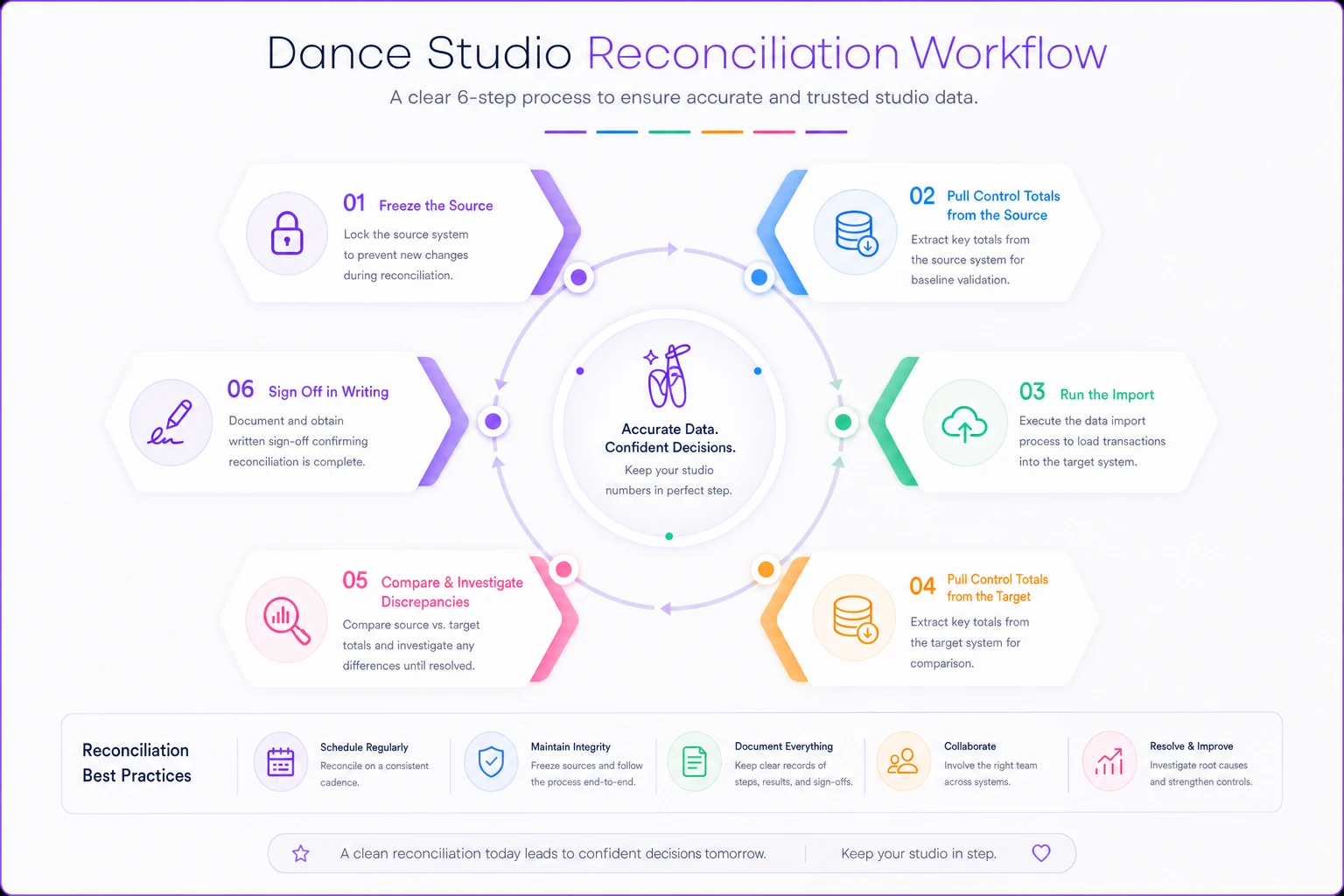
Freeze the source. Stop all edits in the old system. Even one payment posted mid-migration will throw your totals off and send you hunting a phantom.
-
Pull control totals from the source for each entity — count of families, students, and active enrollments; sum of all credit balances; sum of payments for a fixed date window (e.g. last 12 months).
-
Run the import.
-
Pull the same control totals from the target.
-
Compare, apply tolerances, investigate anything outside tolerance.
-
Sign off in writing before anyone touches the new system live.
A visual workflow helps keep the reconciliation steps clear.
Suggested tolerances
| Metric | Target | Tolerance | If exceeded |
|---|---|---|---|
| Family count | Exact | 0 | Hard stop — find missing rows |
| Student count | Exact | 0 | Hard stop |
| Active enrollment count | Exact | ±0 | Hard stop |
| Credit balance total | Exact | $0.00 | Hard stop — sign errors live here |
| 12-month payment sum | Exact | ±$1.00 (rounding) | Investigate if >$1 |
``
STUDIO MIGRATION RECONCILIATION — 2025-01-14
Source freeze time: 2025-01-13 18:00 CST

Entity              Source     Target     Diff     Status
Families            412        412        0        PASS
Students            608        608        0        PASS
Active enrollments  734        731        3        FAIL — INVESTIGATE
Credit balance      $8,420.00  $8,420.00  $0.00    PASS
Payments (12mo)     $214,880   $214,879   -$1.00   PASS (rounding)

Sign-off:    Date: ____
``
That FAIL line is exactly what reconciliation exists for. Three enrollments dropped — probably a class that didn't map to a new class ID. You catch it now, in a spreadsheet, instead of when three families show up to a class the system says they're not in.
The rollback runbook: assume the migration will fail, and be ready
Optimism kills migrations. The teams that recover fastest are the ones who wrote down exactly how to undo everything before they started.
Backup locations. Before import, export the full source dataset to two places: a secured cloud folder and a local encrypted drive. Name them clearly — studiosourcebackup2025-01-13FROZEN.zip. Record the exact paths in the runbook, not "it's on the shared drive somewhere."
RTO / RPO targets. For a studio, reasonable targets are an RTO (recovery time objective) of 4 hours — meaning you can be fully back on the old system within four hours — and an RPO (recovery point objective) of zero, because you froze the source, so no data was created during migration that you'd lose.
Restore steps:
-
Announce rollback decision to staff (script below).
-
Re-enable write access on the frozen source system.
-
Verify the source backup checksum matches the frozen export.
-
Disable the new system's public-facing pages (parent portal, payment links).
-
Point booking/payment links back to the old system.
-
Run verification checks (below).
-
Notify families only if they were exposed to the new system.
Verification checks after rollback:
-
Can a test family log in to the old system?
-
Does a test payment process correctly?
-
Do class rosters match the frozen counts?
-
Are credit balances showing correctly on 3 sampled accounts?
Communication scripts.
To staff: "We've paused the system migration to fix a data issue. Please keep using the old system as normal for check-ins and payments. Nothing you did caused this, and no family data was lost. I'll update you by end of day."
To families (only if needed): "You may have briefly seen our new parent portal today. We've temporarily switched back while we finish some final checks. Please continue using your existing login. Nothing on your account has changed."
The mistake studios make here isn't failing to have backups — it's not deciding in advance what triggers a rollback. Set the trigger now: "If reconciliation shows more than 5 unexplained record differences, or any credit balance mismatch, we roll back." Written down. No debating it at midnight.
Deduplication and matching rules that don't create new messes
Studios accumulate duplicates the way lint accumulates in a dryer. Two entries for the same family — one from a summer camp signup, one from fall enrollment. Migration is your chance to merge them, but blind auto-merging is how you accidentally combine two unrelated families who share a last name.
Use fuzzy matching with explicit thresholds, then a human review tier for anything ambiguous.
Matching rules:
-
Exact email match → auto-merge candidate (confidence 100%). Still review if the names differ wildly.
-
Same last name + same phone (last 7 digits) → high confidence, auto-flag for one-click merge.
-
Fuzzy name match ≥ 0.90 (Jaro-Winkler) + same address → high confidence merge candidate.
-
Fuzzy name match 0.80–0.89 → manual review required. Never auto-merge this tier.
-
Below 0.80 → treat as separate records.
When in doubt, require manual review; it's cheaper than a merged wrong family.
Resolution examples:
-
Jon Alvarez / jon.a@gmail.comandJonathan Alvarez / jon.a@gmail.com→ same email, name similarity high → merge, keep the fuller name. -
Sarah Chen / 512-555-0148andSara Chen / 512-555-0148→ same phone, 0.94 name score → merge. -
Mike Roberts / mike.r@x.comandMichael Roberts / mroberts@y.com→ 0.86 name score, different email, different phone → manual review. These might be the same person or two completely different families. Don't guess.
One thing worth flagging: studios over-trust email as a unique key. Two siblings' parents sometimes share a household email, and divorced-family situations can produce two legitimate households tied to the same contact. Fuzzy matching helps, but the 0.80–0.89 band exists precisely because software shouldn't make that call alone.
Short-term security & access checklist for cutover
During cutover you'll have consultants, staff, and maybe a vendor all touching the same data. That temporary access window is exactly when things leak. Lock it down specifically for the migration period.
-
[ ] Role matrix defined — owner (full), admin (import + reconcile), instructor (read-only rosters), vendor (sandbox only, no production PII)
-
[ ] Encryption at rest and in transit for all backup files (yes, even the local drive)
-
[ ] Audit logging enabled on the target system before the first import — you want a record of who touched what
-
[ ] Temporary cutover controls — payment processing disabled or in test mode until reconciliation passes
-
[ ] Health/medical notes access restricted to owner + admin only
-
[ ] Vendor access is time-boxed — revoke the moment migration completes, don't leave a standing login
-
[ ] MFA required for every account with import or financial access
The commonly missed item is the second-to-last one: vendor access that never gets revoked. Six months later there's still a contractor login with admin rights that nobody remembers creating. Set a calendar reminder to kill it.
Vendor and payment integration checklist
Payment data is the highest-stakes part of any migration because you cannot legally move raw card numbers around. Lean on the processor's tokenization tools rather than trying to be clever about it.
-
[ ] Request a sandbox environment from your new platform before signing off on anything
-
[ ] Confirm the processor supports token migration (moving stored payment methods without touching card data)
-
[ ] Ask about API rate limits — a 600-family bulk import can hit throttling if you don't batch it
-
[ ] Confirm PCI scope — you want the vendor holding it, not you
-
[ ] Test refunds and partial refunds in sandbox before trusting them live
Sample vendor questions to send before you commit:
-
Do you support importing existing payment tokens from Stripe/Adyen, or do families need to re-enter cards?
-
What are your API rate limits for bulk imports, and how do you recommend batching?
-
Is there a sandbox we can load test data into before go-live?
-
How is stored payment data encrypted, and are you PCI DSS Level 1 compliant?
-
What's your rollback support if an import fails midway?
For tokenization specifics, go straight to the source:
-
Stripe
their Migrating to Stripe and PaymentMethods documentation covers importing existing card data via a data migration request.
-
Adyen
their tokenization and migration docs explain moving stored payment details securely.
If a vendor gets vague when you ask how they'll migrate payment tokens, that vagueness is your answer. Reputable processors have a documented, boring, well-worn path for this.
KPIs and formulas to prove the migration worked
A migration isn't "done" when the data lands. It's done when the numbers confirm operations are as good or better than before. Define these before go-live so you have a real baseline to compare against.
| KPI | Formula | Why it matters |
|---|---|---|
| Record integrity rate | (Records reconciled ÷ total records) × 100 | Should be 100% before go-live |
| Payment collection rate | (Successful charges ÷ attempted charges) × 100 | Catches broken payment migration fast |
| Active enrollment retention | (Active enrollments post-migration ÷ pre-migration) × 100 | Detects orphaned enrollments |
| Duplicate rate | (Merged duplicates ÷ total families) × 100 | Measures cleanup quality |
| Support ticket volume | Tickets in week 1 post-migration | Spikes reveal what broke for families |
Recommended dashboard layout: top row shows the three "did nothing break" metrics — record integrity, payment collection rate, enrollment retention. Middle row shows week-over-week support tickets. Bottom row shows credit balance total (source vs. target, side by side) so a mismatch is impossible to miss.
Role-based training and competency sign-off
The people running check-in on Monday morning don't care about your reconciliation report. They care whether the tablet works when a line of parents forms. Train by role, and verify with a quick task check rather than a lecture.
Five-task competency check (front desk):
-
Check in a student for their class
-
Take a payment and issue a receipt
-
Apply an account credit
-
Add a new family and student
-
Look up a family's balance and payment history
Each person completes the five tasks live, an admin signs off, and you keep the form. Name, date, five checkboxes, initials — that's it. The point isn't bureaucracy; it's making sure nobody's guessing during a live class rush.
Scaling the timeline: 50, 200, and 1,000 students
The same steps apply at every size, but the timeline and staffing don't.
| Studio size | Realistic timeline | Reconciliation effort | Notes |
|---|---|---|---|
| ~50 students | 1 weekend | 1 person, ~2 hours | Small enough to eyeball, but still run control totals |
| ~200 students | 1–2 weeks | 1–2 people, half a day | Dedupe review starts mattering here |
| ~1,000 students | 4–6 weeks, phased | Dedicated owner + admin | Batch imports, phased cutover, staged reconciliation by entity |
At the 1,000-student level, don't attempt a single big-bang import. Move families and students first, reconcile, then enrollments and payments. Each phase gets its own reconciliation pass. The temptation to do it all in one weekend is strong and almost always regretted at that scale.
Where this leaves you
A high-level migration plan tells you the destination. This toolkit is the turn-by-turn: the exact fields to map, the totals to compare, the rollback steps for when something breaks, and the sign-offs that prove it worked. The studios that migrate cleanly aren't the ones with the fanciest new software — they're the ones who froze their source, reconciled their control totals, and had a rollback plan they never had to use.
Pull the CSV mappings above into a spreadsheet, fill in your own field names in the "source" column, and you've already done the hardest 30 minutes of the whole project. Everything after that is careful execution.
Ready to elevate your studio operations?
Join 500+ studios using Movioly to save time, reduce admin workload, and enhance student experiences.