

Most studio owners don't buy technology on purpose. They buy it in a panic. Registration season is three weeks out, the old spreadsheet finally broke, a parent complained they couldn't pay online, and suddenly you're on a demo call nodding along while a sales rep shows you a dashboard that looks great and answers almost none of the questions that actually matter.
That's how studios end up locked into a platform that charges 3% on every card swipe, doesn't export student data cleanly, and quietly raises its monthly price the second you cross 200 active families. The software isn't necessarily bad. The procurement was bad. Nobody defined what "good" meant before signing.
This is a playbook for doing it the other way — treating dance studio technology procurement like the multi-year operational decision it actually is. You'll get an RFP structure built for studios, not enterprises, a scorecard weighted around the things that actually break, a migration timeline, and a total-cost-of-ownership checklist that surfaces the fees vendors don't lead with.
The real reason software decisions go sideways
The core problem isn't that studios pick the wrong feature list. It's that they evaluate software the way you'd evaluate a phone — by what it does today — instead of the way you'd evaluate a business partner you're committed to for years.
A studio management platform touches almost everything: enrollment, billing, attendance, payroll inputs, parent communication, recital logistics, and your entire customer database. When you switch, you're not swapping an app. You're relocating the nervous system of the business. That's why the switching cost is brutal, and it's exactly why vendors don't sweat when they underdeliver — they know moving is painful.
Worth naming a pattern here: the features that win demos are almost never the features that cause pain later. Demos sell you the beautiful calendar view. What actually hurts eighteen months in is the report you can't build, the refund flow that takes six clicks, the payout that lands four days later than expected, and the support ticket that sits unanswered during recital week. None of that shows up in a 45-minute sales call unless you force it to.
So the entire job of good procurement is dragging the boring, painful, three-years-from-now stuff into the decision before you sign.
What actually breaks as a studio grows
Software that feels fine at 80 students behaves very differently at 300. Here's where the seams tend to split:
Eliminate scheduling headaches and missed payments.
Movioly streamlines booking, confirming, and managing every class with ease.
- Unified class and instructor scheduling
- Automated student notifications
- Integrated payment tracking
No credit card required
-
Billing complexity. One class, one price is easy. The moment you add sibling discounts, multi-class bundles, punch cards, prorated mid-month enrollments, and recital fees, weak billing engines start producing invoices you have to manually correct. That manual correction is the hidden cost.
-
Communication volume. At 80 families you can email people individually. At 300 you need segmented, automated, logged communication — and you need to know who actually received the recital-costume-deadline notice when a parent swears they never did.
-
Staff and payroll inputs. More instructors, more subs, more pay rules. If attendance and hours don't flow cleanly into whatever you use for payroll, someone is retyping numbers every two weeks and making errors.
-
Reporting. Small studios run on gut. Growing studios need to answer "which classes are actually profitable" and "what's my retention by age group" without exporting three CSVs and building a spreadsheet by hand.
-
Permissions. One owner doing everything doesn't need roles. A team of eight does — and you do not want your front-desk seasonal hire able to issue refunds or see everyone's home address.
The mistake is buying for where the studio is now. You want to buy for the studio you'll be running when current enrollment doubles, because migrating again at that point is the most expensive time to do it.
Build the RFP around outcomes, not features
An RFP for a studio doesn't need to be a 40-page enterprise document. It needs to force vendors to answer the questions they'd rather skip. Structure it in five parts.
-
1. Business context (short). Number of active students, locations, class formats, seasonal enrollment cadence, current tools, and what's driving the change. Vendors give better answers when they know whether you're a 90-student single studio or a three-location operation.
-
2. Must-have capabilities. Write these as scenarios, not checkboxes. Instead of "supports discounts," write: "A family enrolls two children in three combined classes mid-month and qualifies for a sibling discount. Show me the exact invoice this generates and how a proration is handled." Make them show you, not tell you.
-
3. Data and exit terms. This is the section most studios skip and later regret. Ask directly: Can I export all student, payment, and attendance data myself, anytime, in a standard format? What happens to my data if I cancel? Is there a fee to get it out? A vendor who hesitates here is telling you something.
-
4. Pricing transparency. Ask for every cost
monthly platform fee, per-student or tiered pricing, payment processing rate, chargeback fees, SMS costs, add-on module fees, onboarding and setup fees, and what triggers a price increase. Require it in writing.
-
5. Support and reliability. Support hours, response-time commitments, whether you get a real human during your peak season, uptime history, and how they handle outages during registration windows.
Send the same RFP to three or four vendors. The point isn't just the answers — it's watching how they respond. The vendor who answers your data-exit question with a straight paragraph is a different partner than the one who routes you to a "success manager" to "discuss your needs."
The evaluation scorecard
Don't score on vibes. Weight the categories by how much they hurt when they fail, not by how impressive they look in a demo. Here's a scorecard structure that reflects real studio pain, not marketing priorities.
| Category | Weight | What you're actually testing |
|---|---|---|
| Billing & payments accuracy | 20% | Complex invoices, proration, discounts, refund flow, payout timing |
| Total cost of ownership | 20% | Processing rate, all fees, price-increase triggers |
| Data ownership & exit | 15% | Self-serve export, no hostage fees, standard formats |
| Support & peak-season reliability | 15% | Real humans, response times, uptime during registration |
| Communication tools | 10% | Segmentation, automation, delivery logs |
| Reporting & profitability visibility | 10% | Class-level profit, retention, no manual exports |
| Ease of daily use (front desk + instructors) | 10% | Clicks to do common tasks, staff learning curve |
Weight is everything — a platform can win on features and still lose here because it bombed the two 20% categories that determine whether you spend Saturdays fixing invoices.
A couple of notes on using this well. Weight is everything — a platform can win on features and still lose here because it bombed the two 20% categories that determine whether you spend Saturdays fixing invoices. Also, score each category during a demo where you drive, not the sales rep. Ask them to hand over the screen and let you attempt a refund and build a report yourself. What you learn in those two minutes is worth more than the entire pitch.
Total cost of ownership: the fees that don't make the brochure
Sticker price is the smallest part of what you'll pay. Here's the checklist to run before signing:
-
Payment processing rate. The difference between 2.6% and 2.9% + $0.30 sounds small. On a studio running roughly $30k–$40k a month through the platform, that spread adds up to somewhere around $1,000–$1,500 a year — every year — for nothing you can see or feel.
-
Per-student or tier pricing. Find the exact threshold where your monthly bill jumps. A jump from 200 to 201 students shouldn't cost you an extra $80/month, but on some tiered plans it does.
-
SMS and email fees. Text messaging often bills per-message. During recital season, blasting a costume-pickup reminder to 300 families adds up fast.
-
Onboarding / setup / data-import fees. Some vendors charge a one-time fee that isn't quoted until you're mid-signature.
-
Chargeback and dispute fees. What does a disputed payment cost you beyond the refund itself?
-
Add-on modules. Is the recital or costume module included, or is it $40/month extra? Is the reporting you actually need in the base plan or locked behind a "pro" tier?
-
Price-increase policy. Ask flatly
how often do you raise prices, by how much historically, and how much notice do I get? Get the answer in writing.
A realistic way to compare vendors: build a three-year TCO estimate for each using your actual projected volume, not their sample numbers. Two platforms with the same monthly price can differ by several thousand dollars a year once processing rates and add-ons are included. That gap is invisible until you model it.
A migration timeline that doesn't blow up your season
The second most expensive procurement mistake — after buying the wrong platform — is migrating at the wrong time or in the wrong order. Never migrate the week before registration. Never migrate during recital season. Give yourself a runway.
-
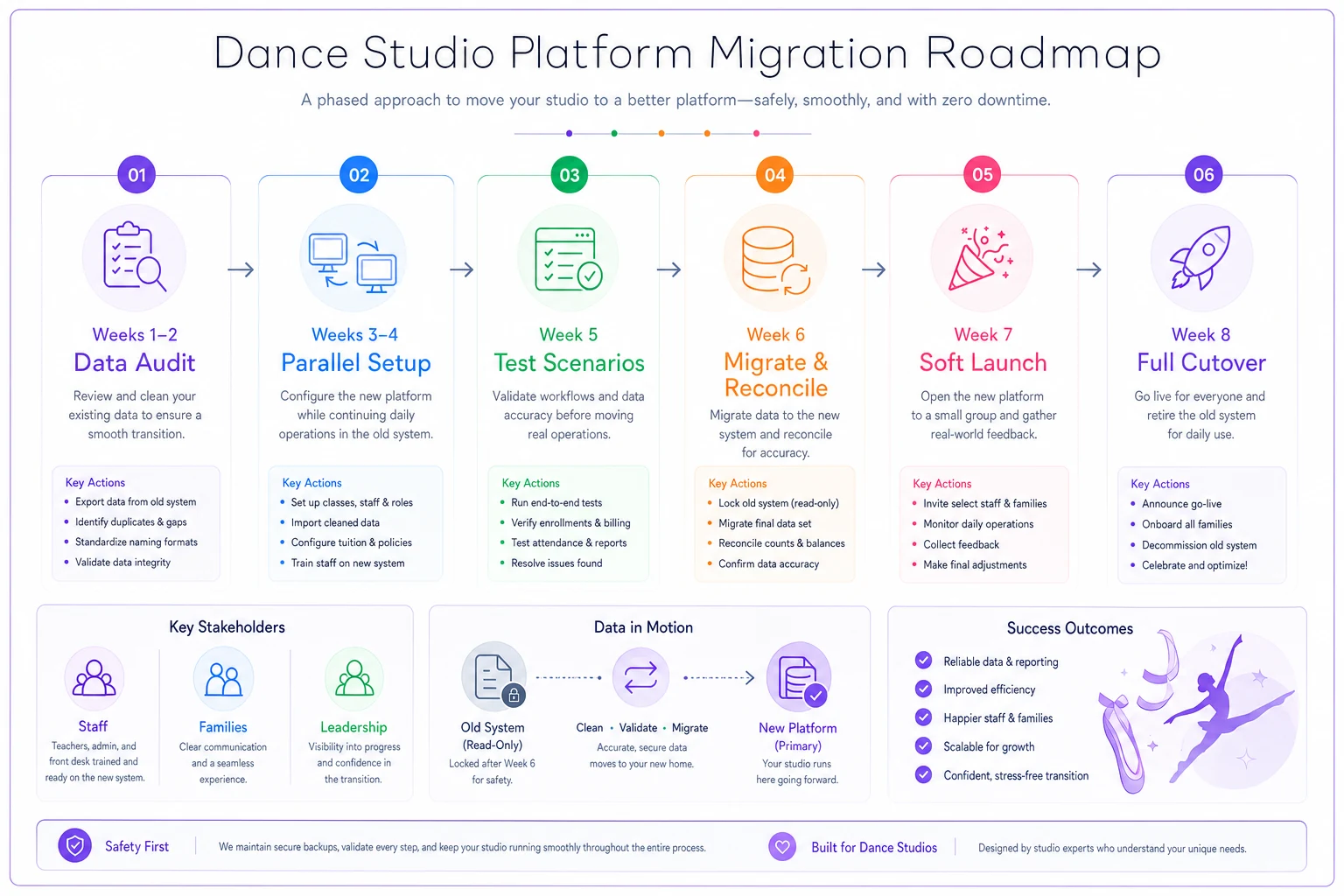
Weeks 1–2
Data audit.
Clean your current data before it moves. Duplicate families, dead accounts, outdated card info — export it and fix it now. Migrating garbage just gives you organized garbage. -
Weeks 3–4
Parallel setup.
Build class structures, pricing, discounts, and staff roles in the new system while the old one still runs live. Don't cancel anything yet. -
Week 5
Test with real scenarios.
Run your ugliest billing cases through the new system — the sibling-discount-plus-proration mess, the mid-season transfer, a full refund. If it survives those, it'll handle normal weeks fine. -
Week 6
Migrate data and reconcile.
Move student records, balances, and saved payment methods. Reconcile every account balance against the old system. Non-negotiable step. -
Week 7
Soft launch.
Turn on the new system for staff first, then a small group of families, before opening it to everyone. -
Week 8
Full cutover + old-system read-only.
Keep the old platform accessible in read-only mode for a full billing cycle so you can cross-check disputes.
Here's a visual workflow of the phased sequence to keep the studio running while you switch.
If you're coming off paper or a patchwork of spreadsheets rather than another platform, the sequencing matters even more — this phased approach to moving from paper to digital workflows covers the on-the-ground steps that keep families from feeling the transition at all.
The sequence above is the same regardless of studio size. What changes is how messy step one gets — a 300-student studio coming off five years of spreadsheets will spend most of its runway in the data audit alone, and that's fine. Rushing past it is where migrations actually fall apart.
Governance: the part nobody sets up until it bites them
Governance sounds corporate, but for a studio it just means: who's allowed to do what, and how do you keep control of your own data. Set this up in week one, not after an incident.
-
Roles and permissions. Front desk shouldn't issue refunds unsupervised. Instructors should see their rosters, not everyone's payment history. Define these before you add staff logins, not after.
-
Data export cadence. Schedule a regular full export of your data — student list, payments, attendance — stored somewhere you control. If the vendor disappears or a dispute goes sideways, you own your business's history.
-
Audit trail. Make sure the system logs who changed what. When a $180 charge gets refunded and nobody remembers doing it, you want a record.
-
Offboarding plan. Write down, on day one, exactly how you'd leave this vendor. It sounds paranoid. It's the single thing that keeps you from being held hostage later.
The financial-controls side of this matters too. If the platform handles automated refunds, credits, and gift-card flows, make sure those processes have real approval checkpoints rather than letting anyone push through anything — this breakdown of automating refunds and credit flows shows where those guardrails should actually sit.
Governance isn't glamorous and it's easy to defer. Most owners set up permissions in about twenty minutes when they first onboard, then never revisit them as staff turnover happens. That's when you end up with three ex-employees who technically still have admin access. Worth a quarterly check.
A quick real-world scenario
A single-location studio running around 240 active students switched platforms mid-summer after their old system botched a batch of recital-fee invoices. They almost signed with the vendor that gave the flashiest demo — until they ran the TCO model.
On paper, the two finalists looked nearly identical: about $150/month base. But once they factored in the processing rate difference (2.9% + $0.30 vs. 2.6%), the "pro" tier they'd need for class-profitability reporting, and per-message SMS costs during busy months, the flashier option came out roughly $2,400–$2,800 more expensive over the first year. Same features. Very different bill.
They also found, buried in the RFP responses, that the flashier vendor charged a fee to export historical data on cancellation. That single answer moved them to the other platform. A year later, when they wanted to test a competitor, they exported everything themselves in an afternoon — no fee, no hostage situation. The cost savings were real, but having an actual exit option was the part that protected them long-term.
When this level of rigor makes sense — and when it doesn't
If you're running under about 60 students with simple flat-rate pricing and no staff besides yourself, a full RFP is overkill. Pick a reputable platform, check the data-export and processing-rate terms, and move on.
The rigor pays off at the growth inflection point — roughly 150 students and climbing, multiple instructors, complex pricing, or a second location on the horizon. That's exactly when a bad software decision compounds, and exactly when switching later costs the most.
The one group that should never skip the data-ownership and TCO sections: anyone who's already been burned once. If you've migrated before and remember what it cost you, you know the flashy demo isn't the risk. The contract terms are.
Bringing it together
Good dance studio technology procurement isn't about finding the platform with the most features. It's about defining what "good" means for your studio before a sales rep defines it for you — then holding every vendor to the boring, expensive, three-years-out realities they'd rather not discuss.
Write the RFP around scenarios. Score on weighted pain, not demo dazzle. Model the true cost including every fee. Time your migration away from your busiest weeks. Set up governance so you always own your data and always have a way out.
Do that, and the platform becomes what it should be — quiet infrastructure that runs in the background while you teach — instead of a decision you spend the next three years regretting.
Good dance studio technology procurement isn't about finding the platform with the most features. It's about defining what "good" means for your studio before a sales rep defines it for you — then holding every vendor to the boring, expensive, three-years-out realities they'd rather not discuss.
Write the RFP around scenarios. Score on weighted pain, not demo dazzle. Model the true cost including every fee. Time your migration away from your busiest weeks. Set up governance so you always own your data and always have a way out.
Do that, and the platform becomes what it should be — quiet infrastructure that runs in the background while you teach — instead of a decision you spend the next three years regretting.
Ready to elevate your studio operations?
Join 500+ studios using Movioly to save time, reduce admin workload, and enhance student experiences.