

Nobody tells you this when you start wiring up your studio's tools: the automation itself is usually the easy part. Zapier, native integrations, a checkout that syncs to your CRM — all of that works fine in isolation. What breaks is the architecture underneath it. The invisible decisions about which system is the source of truth, what happens when two tools disagree, and who gets blamed when a parent gets charged twice for a class they already dropped.
Studios rarely think about dance studio integration architecture as something you actually design. It just accumulates. You add a booking tool, then a payment processor, then an email platform, then a separate attendance app because the first one was clunky. Six months later you've got five systems half-connected by automations you can't remember setting up, and every one of them thinks it's in charge of your student list.
This article is about the plumbing. Not the flashy stuff — the boring architectural decisions that determine whether your automations quietly save you hours or quietly corrupt your data for months before anyone notices.
Why studio tech stacks turn fragile without anyone doing anything wrong
The frustrating part is that fragile setups usually come from good intentions. Each individual decision made sense at the time.
You picked a scheduling tool because it handled recital season well. You added a separate payment platform because it had lower fees. You kept email in a third system because you already knew it. None of those were mistakes. But nobody stepped back and asked: when a student's info changes in one place, how does every other system find out?
This is where things quietly rot. A family updates their phone number in your booking portal. That change never reaches your email tool. Three weeks later you send a "your card failed" text to a dead number and lose the student. Nobody automated anything wrong — the automation just didn't exist to carry that one field across.
There's a predictable pattern in small operations: the more tools you add, the more the gaps between tools become your actual bottleneck. You stop losing time inside any single app and start losing it in the seams. Staff develop weird manual rituals — "always update the roster in two places," "check the payment dashboard before sending the newsletter" — and those rituals become tribal knowledge that walks out the door when someone quits.
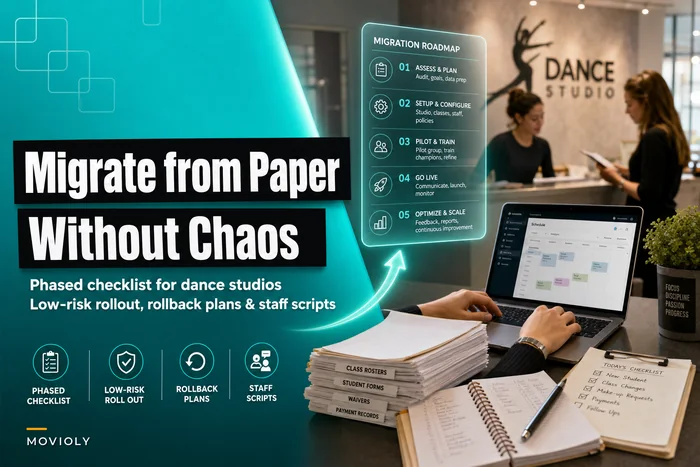
If you're still moving off paper or spreadsheets, this is the moment to think about architecture before you connect things. It's a lot easier to design the flow up front than to untangle it later — something we get into more in the phased checklist for moving to digital workflows.
The three architecture patterns, and when each one actually fits
1. Direct API (point-to-point)
Eliminate scheduling headaches and missed payments.
Movioly streamlines booking, confirming, and managing every class with ease.
- Unified class and instructor scheduling
- Automated student notifications
- Integrated payment tracking
No credit card required
Tool A talks straight to Tool B. Your checkout pushes a new customer directly into your CRM. Simple, fast, cheap.
The catch: every new tool multiplies the connections. Two tools = one link. Five tools connected to each other = up to ten links to maintain. When one vendor changes their API or a field name, you're hunting through a web of direct connections trying to figure out which one broke.
2. Middleware (a hub in the middle)
Instead of every tool talking to every other tool, everything connects to a central layer — a workflow platform or integration hub that acts as the traffic controller. When your booking system gets a new student, it tells the hub, and the hub decides who else needs to know.
More work to set up, but it scales far better. You add a sixth tool by connecting it to the hub once, not to five other tools individually.
3. Event-driven
Systems announce events — "student enrolled," "payment failed," "class cancelled" — and any tool that cares can react. Nothing is hard-wired to anything else. It's the most flexible and the most resilient, because you can add or swap tools without rewiring everything.
The downside is complexity. For a single-location studio with 200 students, full event-driven architecture is overkill. It starts earning its keep when you're multi-location or running high volume across many class types.
| Situation | Best-fit pattern | Why |
|---|---|---|
| 1–2 tools, small studio | Direct API | Cheap, simple, few things to break |
| 3–5 tools, growing | Middleware hub | Central control, easier to add tools |
| Multi-location or high volume | Event-driven | Resilient, swap tools without rewiring |
| Mixed maturity (common) | Middleware + a few direct links | Pragmatic; hub for critical data, direct for one-offs |
Most studios should move to middleware as the backbone the moment they hit a third or fourth tool. That single decision prevents the majority of the seam problems described above.
The ownership problem: which system is allowed to be right?
Almost everyone skips this part. It's also the part that causes the ugliest failures.
Every piece of data in your studio needs one system that owns it — the authority. If a student's email lives in three tools, one of them has to be the boss. When they disagree, the owner wins and everyone else updates to match.
Without a clear owner, you get ghost data. A parent's balance shows $0 in the payment tool but $45 owed in the booking system. Both are "automated." Both are confident. Your front desk now has to manually reconcile, which defeats the entire point.
-
Student & family records → owned by your CRM or student management system
-
Payments, balances, refunds → owned by your payment/billing system
-
Class schedule & capacity → owned by your scheduling tool
-
Attendance → owned by whatever staff actually touch in-studio
-
Marketing consent & email status → owned by your email platform
When you draw the ownership map, add a contact for each owner so someone knows who to call when data disagrees.
The rule is simple: data flows out of its owner, never into it from a competing source. Attendance can read the roster, but it should never overwrite student records. Your email tool can read balances to trigger a reminder, but it should never decide what someone owes.
Refunds and credits are where ownership gets violated most often, because they touch billing, records, and communication all at once. If three systems each think they can issue or track a credit, you end up with double refunds and confused families. We break down a cleaner flow for that specific mess in automating refunds, credits and gift-card flows.
A real scenario: how one broken seam cost a studio students
A mid-sized studio — roughly 260 active students across ballet, jazz, and a competitive team — had what looked like a solid setup. Booking tool, a separate card processor, and an email platform, all connected with a handful of direct automations built over two years by whoever happened to be available at the time.
The problem showed up slowly. When a family paused enrollment for the summer, the booking tool marked them "inactive." But that status change never reached the email platform, which kept them on the active newsletter list and flagged them as current students in a re-enrollment automation. So paused families got "welcome back" reminders in July that read like the studio had forgotten they'd left — while genuinely active families sometimes got dunning texts because a failed-card event fired before the payment system finished retrying.
The owner estimated they were losing somewhere around 4–6 students a term to these mixed signals — families who assumed the studio was disorganized and quietly didn't come back. At their pricing, that's roughly $6k–$9k a year leaking out through a data seam nobody could see.
The fix wasn't a new tool. They introduced a middleware hub, named the payment system as the sole owner of billing status and the booking system as the sole owner of enrollment status, and rebuilt the automations so the email platform only ever read those statuses. The contradictions basically stopped within a month. Same tools, better architecture.
When automation is actually a bad idea
Automation gets treated like it's always the goal. It isn't. Some processes should stay manual on purpose.
-
When the process changes every term. If your recital logistics look different every year, automating them just bakes in last year's assumptions. Let a human run it until it's stable.
-
When the cost of a wrong action is high. Auto-charging a card, auto-cancelling a class, auto-emailing a whole parent list — these are one-way doors. A human review step here is cheap insurance.
-
When you can't yet explain the process in writing. If you can't document the workflow clearly, you can't automate it safely. You'll just automate your own confusion faster.
Who should not be rushing into complex integrations? A single-instructor studio with 40 students and one payment tool. You'd spend more time maintaining the plumbing than you'd ever save. Keep it simple until the pain is real.
The automation risk checklist
Before you turn on any new automation — or if you're auditing what you already run — go through this.
-
[ ] Ownership Which single system owns each piece of data this automation touches?
-
[ ] Direction Does data flow out of its owner, never overwriting it from another source?
-
[ ] Failure behavior What happens if this automation fails silently? Would you notice within a day, or a month?
-
[ ] Duplicates Can this automation fire twice for the same event? (Double refunds, double emails.)
-
[ ] Timing/race conditions Could this fire before another system finishes its work — like a dunning text before the retry completes?
-
[ ] One-way doors Does it take an irreversible action (charge, cancel, mass email) without a human checkpoint?
-
[ ] Stale data If a field changes, will every downstream tool find out, and how fast?
-
[ ] Ownership handoff If the person who built this leaves, is it documented well enough for someone else to fix?
-
[ ] Kill switch Can you turn it off quickly without breaking three other things?
-
[ ] Testing Did you test it with a real edge case (a paused family, a failed card, a mid-term transfer) — not just the happy path?
Anything you can't answer confidently is a fragility risk.
A simple process for auditing what you already have
If your stack already grew wild, here's a sane order to untangle it:
-
List every tool and every automation between them. Actually write it down. Most studios discover automations they forgot existed.
-
Assign a single owner to each data type. Records, billing, schedule, attendance, consent. No sharing.
-
Find every place a non-owner writes back to an owner. Those are your highest-risk seams. Fix or remove them.
-
Identify silent-failure points. Any automation whose failure you wouldn't notice for weeks gets a monitoring or notification step added.
-
Decide your backbone pattern. If you're at three-plus tools, route critical data through a middleware hub instead of a web of direct links.
-
Rebuild the fragile automations against the ownership map — reads and writes flowing the right direction.
-
Document each one in plain language. What it does, what it touches, how to turn it off.
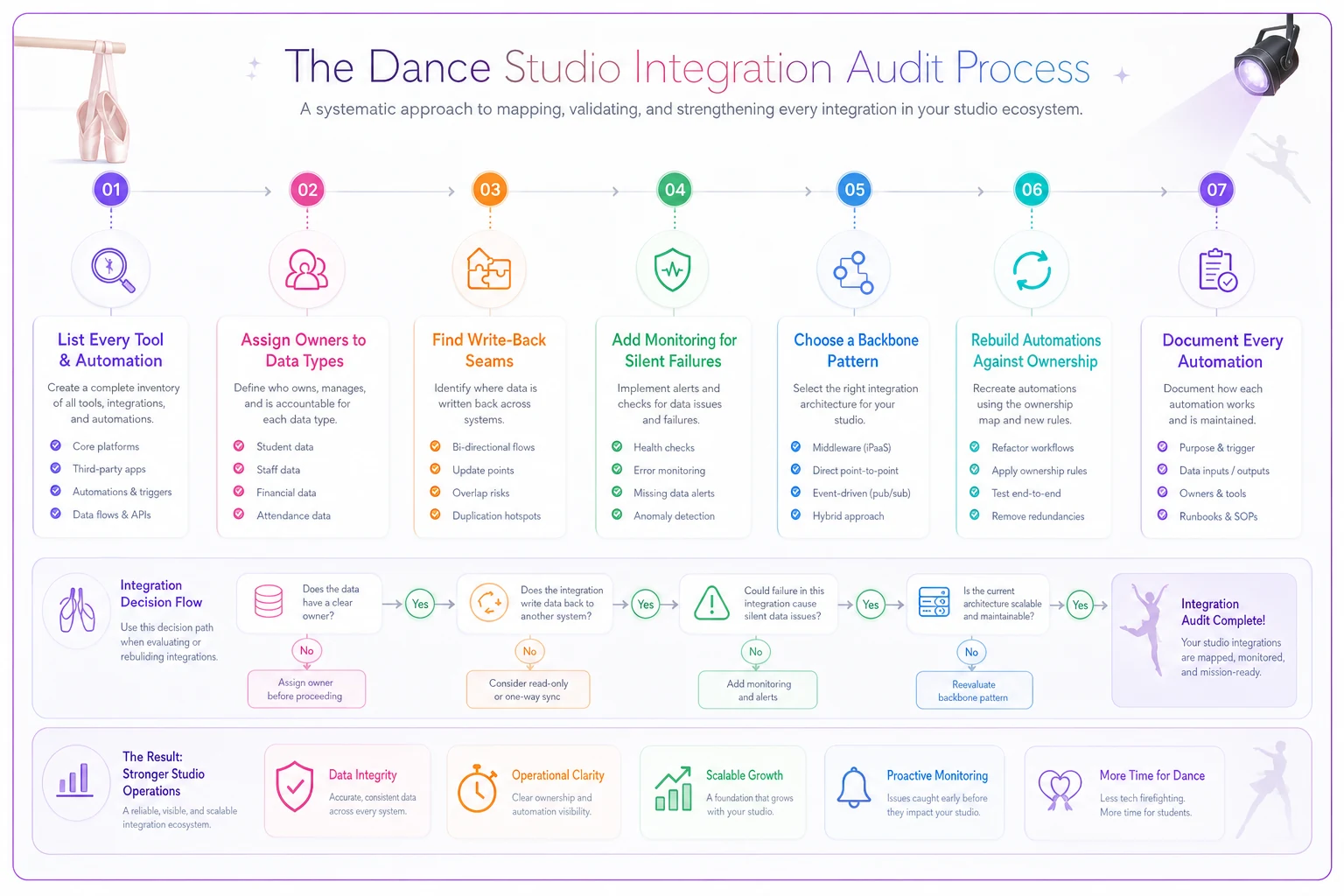
Here's a simple diagram of that audit process.
You don't have to do all seven in a weekend. Doing them in this order means you fix the dangerous stuff first. Most studios find that steps 1 through 3 alone surface enough to keep them busy for a week.
The mindset shift that keeps this from happening again
The studios that stay out of integration hell aren't the ones with the fanciest tools. They're the ones who treat their tech stack like a small system with rules, not a pile of features they keep bolting on.
Two habits make the difference. First, every time you add a tool, you ask what it owns and what it's only allowed to read. Second, every automation gets the risk checklist run against it before it goes live — not after it's already double-charging people.
Nobody brags about their ownership map. But architecture is the quiet thing that decides whether your automations are saving you fifteen hours a week or slowly generating a backlog of angry parent emails you'll spend those same fifteen hours cleaning up. Get the plumbing right, and the automations mostly take care of themselves.
Nobody brags about their ownership map. But architecture is the quiet thing that decides whether your automations are saving you fifteen hours a week or slowly generating a backlog of angry parent emails you'll spend those same fifteen hours cleaning up. Get the plumbing right, and the automations mostly take care of themselves.
Ready to elevate your studio operations?
Join 500+ studios using Movioly to save time, reduce admin workload, and enhance student experiences.