

The problem with hybrid dance classes isn't the technology. Most studios can figure out a camera and a Zoom link in an afternoon. The problem shows up three weeks later, when the virtual students are visibly behind, the in-studio parents are quietly annoyed that the instructor keeps glancing at a laptop, and nobody can tell you whether the Thursday remote kids actually got credit for the classes they "attended."
Hybrid falls apart in the operational seams, not the tech. So this piece stays narrow: how to set up the room and AV so pedagogy survives, how to write attendance-crediting rules that hold up when a parent disputes them, how to cap bookings before a class tips into unteachable, and how to price and coach so the two modalities don't quietly drift into two different quality levels.
Where hybrid actually breaks (and it's not the camera quality)
Most owners assume a better camera fixes hybrid. It doesn't. A crisp 4K feed of an instructor who never looks at the screen is still a bad class for the remote kid.
The real failure pattern looks like this: the instructor teaches to the room because the room is right there — they can see it, correct it, feel its energy. The virtual students become a tab. They get the choreography but miss the correction, the "no, weight over your standing leg," the small stuff that's the entire point of a dance class. Within a month, the remote group is a level behind, and now you have a pedagogy gap baked into your roster.
The second break is attendance. In-studio attendance is obvious — the kid is on the floor or they aren't. Virtual attendance is fuzzy. Did logging in count? What if their camera was off the whole time and you have no idea if they danced or watched YouTube? When a parent asks for a makeup credit for a virtual class their kid "took," you need a rule that existed before the argument.
The third break is capacity. A ballet class that works great at 12 in-studio bodies doesn't work at 12 in-studio plus 8 remote. The instructor's attention is a fixed resource. Adding remote seats feels free because they don't take up floor space, but they absolutely take up teaching bandwidth.
AV setup: build for correction, not just for broadcast
The goal of your AV setup is not to livestream a performance. It's to let the instructor coach someone who isn't in the room. That changes every equipment decision.
Eliminate scheduling headaches and missed payments.
Movioly streamlines booking, confirming, and managing every class with ease.
- Unified class and instructor scheduling
- Automated student notifications
- Integrated payment tracking
No credit card required
Here's the setup that consistently works for a single-room studio without turning into a production nightmare:
-
Two camera angles, not one. A wide angle on a tripod at the front captures full-body movement — non-negotiable for dance, since a chest-up webcam view is useless for footwork. A second phone or webcam near the mirror gives the instructor a "what the room sees" angle. You don't need a switcher; most instructors just pin the wide angle by default.
-
A dedicated monitor the instructor can actually see. A laptop on the floor is where hybrid dies. Put a TV or large monitor at the back of the room, at eye level, facing the instructor. If they can glance at the remote grid the way they'd glance at the back row, remote kids get corrections. If they have to crouch to a laptop, they won't.
-
A lapel or headset mic. Room mics pick up the sound system and echo. The remote kids need to hear the count and the correction over the music, not a muddy wash. This is the single cheapest upgrade with the biggest payoff.
-
A speaker feeding remote audio into the room — optional, and often worth skipping. Two-way audio sounds nice but usually creates chaos: feedback, dog barking, siblings. Most studios run remote students muted by default and use a hand-raise or chat for questions.
A realistic gear budget for one room runs roughly $400–$900: a decent wide webcam or a repurposed phone on a tripod, a lapel mic, an HDMI capture setup or a smart TV, and a stable mount. You don't need a $3k rig. You need the instructor to be able to see and hear the remote group without contorting themselves.
You don't need a $3k rig. You need the instructor to be able to see and hear the remote group without contorting themselves.
Here's a quick visual of the AV workflow this setup supports.
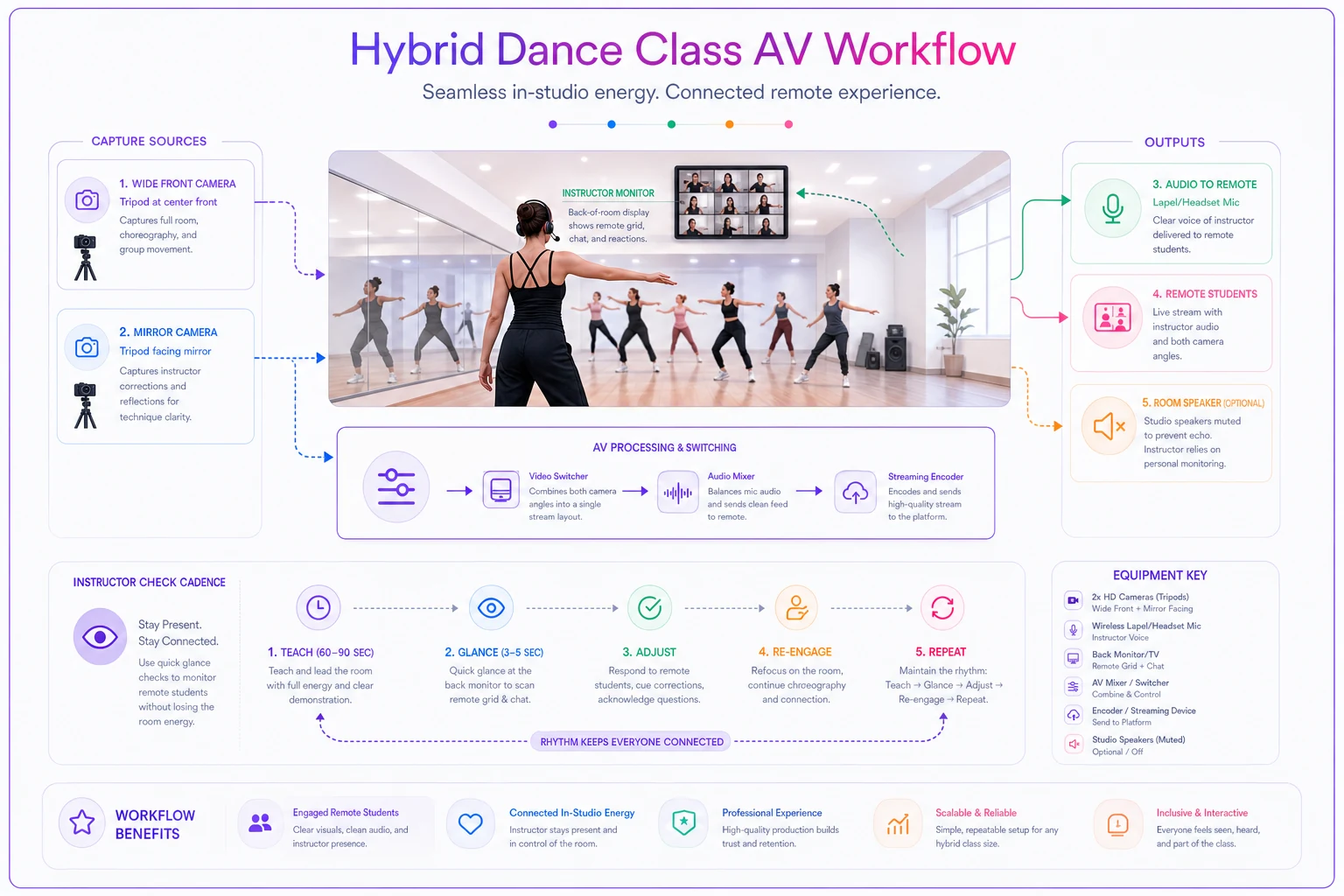
One thing worth flagging: studios that mount the remote monitor where students can see it too — not just the instructor — tend to get better energy in the room. In-studio kids wave, remote kids feel present, and the "them vs. the tab" dynamic softens. Small thing, real difference.
Attendance crediting: write the rule before the dispute
Attendance crediting is where hybrid quietly leaks money and goodwill. You need a written rule that answers three questions, and it needs to be visible to parents at signup, not buried in a handbook nobody reads.
Question 1: What counts as attending a virtual class? Define it concretely. A defensible standard: camera on for at least the working portion of class, present at start and end. "Logged in" is not attendance — a kid can log in and walk away. If you can't verify participation, you can't credit it fairly, and you'll end up arguing case by case.
Question 2: Can a student switch modalities per class, and does that affect credit? Decide whether a student enrolled in-studio can drop into the virtual version when they're sick or traveling. Most studios that get this right allow it as a makeup mechanism, not a free swap. So a missed in-studio class can be made up by attending the virtual version of the same class that week — but the student's home modality stays fixed for billing.
Question 3: How do credits and makeups work across modalities? Here's a simple crediting matrix that removes most of the arguments:
| Situation | Counts as attended? | Makeup credit issued? |
|---|---|---|
| In-studio, present | Yes | No |
| Virtual, camera on, full class | Yes | No |
| Virtual, logged in, camera off/absent | No | No — treated as a no-show |
| Missed in-studio, attended virtual same week | Yes (as makeup) | No additional credit |
| Missed both, notified in advance | No | Yes — one makeup per policy |
| Tech failure on studio's end | Yes | Yes — studio's fault, credit issued |
The last row matters more than owners expect. If your stream drops for 20 minutes because the WiFi choked, that's on you, and the credit should be automatic. Parents forgive tech failures they're not billed for. They don't forgive being charged for a class the studio broke.
Whatever you decide, enforcement has to be consistent — which is the real challenge. Manually tracking who had their camera on for which class is a nightmare in a notebook. This is exactly the kind of record-keeping that pushes studios off paper. If you're still tracking any of this by hand, the phased approach in this migration checklist for moving to digital workflows applies directly, because hybrid attendance is nearly impossible to run cleanly on paper.
Booking caps: two numbers, not one
The mistake is treating a hybrid class as having a single capacity number. It has two, and they're not additive.
Think of it as an attention budget. An instructor teaching a technique class can meaningfully correct maybe 14–16 bodies total before quality drops — and remote bodies cost more attention per head because correcting them is harder. So a class that caps at 14 in-studio might realistically cap at something like 12 in-studio plus 4 remote, or 10 plus 6. The remote seats aren't free capacity; they're expensive capacity.
-
Establish the total attention cap for the class type. Technique and levels classes run lower (14–16); open/recreational or cardio-style classes can run higher (20+) because they need less individual correction.
-
Set a hard remote sub-cap. Past 6–8 remote students, the instructor genuinely cannot monitor the grid while teaching the room. Beyond that, the remote grid becomes wallpaper.
-
Weight remote seats. A practical rule
each remote seat counts as roughly 1.25–1.5 in-studio seats against the total attention cap. It stops you from overselling a class into unteachable.
-
Lock the caps in your booking system so a class auto-closes at the right combined number instead of relying on someone eyeballing the roster.
When this makes sense: technique, ballet, contemporary, anything correction-heavy. When it doesn't: don't run hybrid on classes built around partnering, lifts, or close spatial work — the remote kid can't participate in the actual content, and you're selling them a worse product. Some classes should stay in-studio only, and saying so protects your reputation more than the extra remote revenue helps it.
Pricing and seating rules that don't punish either group
Pricing hybrid badly creates resentment fast. If remote costs the same as in-studio, in-studio parents feel like they're overpaying for the room they're physically using. If remote is much cheaper, those same parents start wondering why they bother showing up.
-
Small discount for remote-primary, not a big one. Something like 10–15% off. It acknowledges the reduced physical resource use — floor space, front-desk time — without signaling "this is the budget version."
-
Charge for the modality they enrolled in, not per-class switches. If a student is in-studio primary but occasionally goes virtual as a makeup, don't re-price it. Billing complexity kills goodwill faster than almost anything else.
-
A "flex" tier at a premium for families who genuinely need to switch week to week — travel-heavy families, shared-custody schedules. Price it above in-studio, not below, because flexibility is a feature you're providing, not a discount you're giving.
On seating: reserve the front-of-room floor for in-studio students and keep the remote grid on the back monitor. Obvious, maybe, but studios that let the layout blur — laptop in the corner, remote kids as an afterthought — end up teaching two classes badly instead of one class well.
Instructor coaching: the part that actually preserves pedagogy
You can nail the AV, the caps, and the pricing and still lose pedagogy if the instructor doesn't know how to teach two rooms at once. This is a trainable skill, and it's the piece most studios skip entirely.
-
They call remote students by name, out loud, on a rhythm. "Maya, drop that shoulder." Naming remote kids forces the instructor to actually watch the grid, and it tells the remote student they're seen. Set an expectation: every remote student gets named at least twice per class.
-
They demo facing the camera, not just the mirror. Turning to the wide camera for key demonstrations costs nothing and completely changes the remote experience.
-
They use a check-in cadence. Every 10–15 minutes, a quick glance-and-correct sweep of the remote grid. Without a cadence, remote kids only get attention when something goes obviously wrong — which is usually too late.
-
They pre-plan which combinations don't hybridize. Partnering day? That's a floor-only day, and the schedule should say so in advance so remote families aren't blindsided.
A useful internal metric: track whether remote students are progressing at the same level as in-studio students in the same class. If your remote group is consistently a level behind by mid-term, the coaching — not the tech — is the problem. This kind of drift also compounds during high-pressure stretches, which is worth keeping in mind alongside the discipline of protecting regular class progress during recital crunch, covered in this 12-week operational timeline for recital season.
A real scenario: what fixing the seams looked like
A mid-size studio — around 260 students, two rooms — added hybrid during a stretch when a chunk of families kept traveling for club sports. The first attempt was rough: one laptop per room, no attendance rule, remote priced 40% below in-studio, no cap on remote seats. Within about six weeks the remote kids were noticeably behind, three families had disputed makeup charges, and one popular class had ballooned to 11 in-studio plus 9 remote — genuinely unteachable.
They reset it. Bumped each room to a back-wall monitor and a lapel mic (roughly $650 per room). Wrote the crediting matrix above and posted it at enrollment. Weighted remote seats and hard-capped remote at 6. Repriced remote to 12% off instead of 40%, and coached instructors to name remote kids and demo to camera.
The gap closed over the following term — remote students tracked much closer to their in-studio peers at the next placement review. Makeup disputes basically stopped once the rule was written down and visible. The class that had ballooned settled into a combined size the instructor could actually teach. Revenue from the flex tier came in around $1,400–$1,800 a month, which covered the AV upgrade within the first term.
The short version
Hybrid dance classes succeed or fail on rules, not gear. The camera is the easy part. What actually protects pedagogy is a room setup that lets the instructor coach the people who aren't there, an attendance-crediting rule written before the first dispute, capacity caps that treat remote seats as the expensive attention they really are, pricing that doesn't make either group feel cheated, and instructors trained to teach two rooms as one class.
Start with the crediting matrix and the remote sub-cap — those two decisions prevent most of the pain. Get the monitor off the floor and onto the wall. Then coach the naming habit. Do those four things and hybrid stops feeling like two classes fighting for one instructor's attention.
Ready to elevate your studio operations?
Join 500+ studios using Movioly to save time, reduce admin workload, and enhance student experiences.