

Most studios don't lose their student records in some dramatic hard-drive crash. They lose them slowly, in ways nobody notices until it matters — a part-time admin deletes the wrong roster, a platform downgrade wipes archived medical notes, a card processor change breaks the payment history link, or a cancelled subscription takes six years of attendance data with it when the free export window closes.
The painful part is that almost every studio thinks it has backups. "It's all in the cloud." That sentence has cost more studios their recital rosters and emergency-contact lists than any fire or flood. Cloud storage is not a backup. A backup is a copy you control, on a schedule you set, that you have actually tested restoring.
This post gives you the smallest possible policy that still holds up when someone — a parent's lawyer, an insurer, a franchise HQ, a new business partner — asks "how do you protect our children's records?" No IT jargon. Just targets, a drill you run once a year, and a one-page attestation you can sign.
First, separate your record types — they don't deserve equal protection
The biggest mistake studios make is treating all data the same. Your marketing email list and a 9-year-old's medical alert note do not carry the same risk. If you back everything up on one blanket schedule, you'll either over-invest in protecting junk or under-protect the records that could actually hurt a family.
Break student records into tiers based on two questions: How badly does it hurt if we lose it? and How badly does it hurt if the wrong person sees it?
Here's a working breakdown using real studio record types:
| Record type | Example fields | If lost | If leaked | Tier |
|---|---|---|---|---|
| Safety-critical | Allergies, medical alerts, custody/pickup restrictions, emergency contacts | Child safety risk | Serious privacy harm | Critical |
| Enrollment & financial history | Payment records, enrollment contracts, outstanding balances | Can't bill, disputes | Moderate | High |
| Progress & attendance | Class rosters, attendance logs, placement/level history | Hard to reconstruct, parent trust | Low | High |
| Consent & media | Photo/video consent, waiver signatures | Legal exposure | Moderate | High |
| Operational | Schedules, instructor notes, email lists | Annoying | Low | Standard |
"Critical" isn't your biggest data pile — it's usually a small set of fields buried inside your student profiles. But those few fields are the ones you absolutely cannot lose and absolutely cannot leak. Your whole policy should be built around protecting those first.
If you're thinking about how your platform choice affects what you can even export and retain, that's worth its own look — platform structure quietly determines a lot of this, which we get into in how platform choice affects media-consent, retention and audits.
Set RTO and RPO targets in plain English
These two terms sound technical but they're just two simple promises you make to yourself.
Eliminate scheduling headaches and missed payments.
Movioly streamlines booking, confirming, and managing every class with ease.
- Unified class and instructor scheduling
- Automated student notifications
- Integrated payment tracking
No credit card required
RPO (Recovery Point Objective) = how much data you're willing to lose, measured in time. If your RPO is 24 hours, it means "if everything blows up, we're okay losing up to one day of changes." That number tells you how often to back up.
RTO (Recovery Time Objective) = how fast you need to be back up and running. If your RTO is 48 hours, it means "we must have our records usable again within two days."
A studio doesn't need aggressive targets. You're not a hospital. But your critical tier deserves tighter numbers than your email list. Here's a realistic set most small-to-mid studios can actually hit without hiring anyone:
| Tier | RPO (max data loss) | RTO (back up and usable) | Backup frequency |
|---|---|---|---|
| Critical (safety) | 24 hours | 24 hours | Daily |
| High (financial, attendance, consent) | 24–48 hours | 3 business days | Daily |
| Standard (operational) | 1 week | 5 business days | Weekly |
One honest note on these numbers: don't pick targets you can't actually meet. An RTO you fail during a real incident is worse than a modest one you hit. If you can only realistically restore records in three days because you'd need to re-import a CSV and reconcile it, write "3 days" and plan around that. Setting a one-hour RTO you have no chance of meeting just makes the attestation a lie.
The minimal backup setup that actually works
You don't need enterprise software. What you need is the old 3-2-1 idea, scaled down for a studio:
-
3 copies of your critical and high-tier records
-
2 different storage types (e.g., your platform + a cloud drive you control)
-
1 copy somewhere off your main system (a separate account, offline drive, or different provider)
In practice for a studio, that looks like this:
-
Primary copy — lives in your management platform (your day-to-day system).
-
Scheduled export — a monthly (or weekly, for critical data) export to a folder you own, in a plain format like CSV or PDF. This is the one that saves you when a subscription lapses or a vendor changes terms.
-
Off-site copy — that export folder synced to a second cloud account or copied to an encrypted drive kept at home.
The export step is the one studios skip, and it's the one that matters most. A copy that only exists inside a platform you don't control disappears the day you stop paying — or the day the platform decides your plan tier no longer includes data history.
Check your export files periodically to ensure all critical fields are included.
A practical note on format: export your financial and enrollment data as CSV so it's re-importable, but export signed consents and waivers as PDFs so the signatures and dates stay intact. If you're ever actually moving systems, the mechanics of clean exports, reconciliation, and rollback matter a lot — the studio migration toolkit covers that in depth, and the same discipline applies to your routine backups.
The part everyone skips: actually restoring
Studios set up backups, feel safe, and never once test them. Then the day they need to restore, they find out the export was missing a column, the medical notes field never exported, or the CSV won't re-import because the date format changed.
A backup you've never restored is a guess, not a safety net.
That's why the whole policy hinges on one thing you do once a year: a restore drill. It takes about 90 minutes. You pretend you've lost everything and prove you can get it back.
Annual restore-drill template
-
Pick a scenario. Choose one
"our platform account was locked," "an admin deleted the fall roster," or "we're migrating and need to reconstruct records." Rotate the scenario each year.
-
Locate your most recent backup. Time how long it takes you to find it. If you can't find it within 15 minutes, that's worth writing down.
-
Restore a sample. Don't restore everything. Pick 10 student records across tiers — a couple with medical alerts, a couple with payment history, a couple with signed consents. Rebuild those 10 into a test spreadsheet or a sandbox.
-
Verify completeness. For each of the 10, check every critical field is present and correct: emergency contact and phone, medical/allergy alerts, custody or pickup restrictions, current balance and payment status, and signed consent date.
-
Time the whole thing. Did you meet your RTO? Did the backup's age fall within your RPO?
-
Write down what broke. Missing fields, wrong formats, slow access, forgotten passwords. These are exactly what will bite you in a real incident.
-
Fix one thing. Don't try to fix everything. Pick the biggest gap and close it before the next drill.
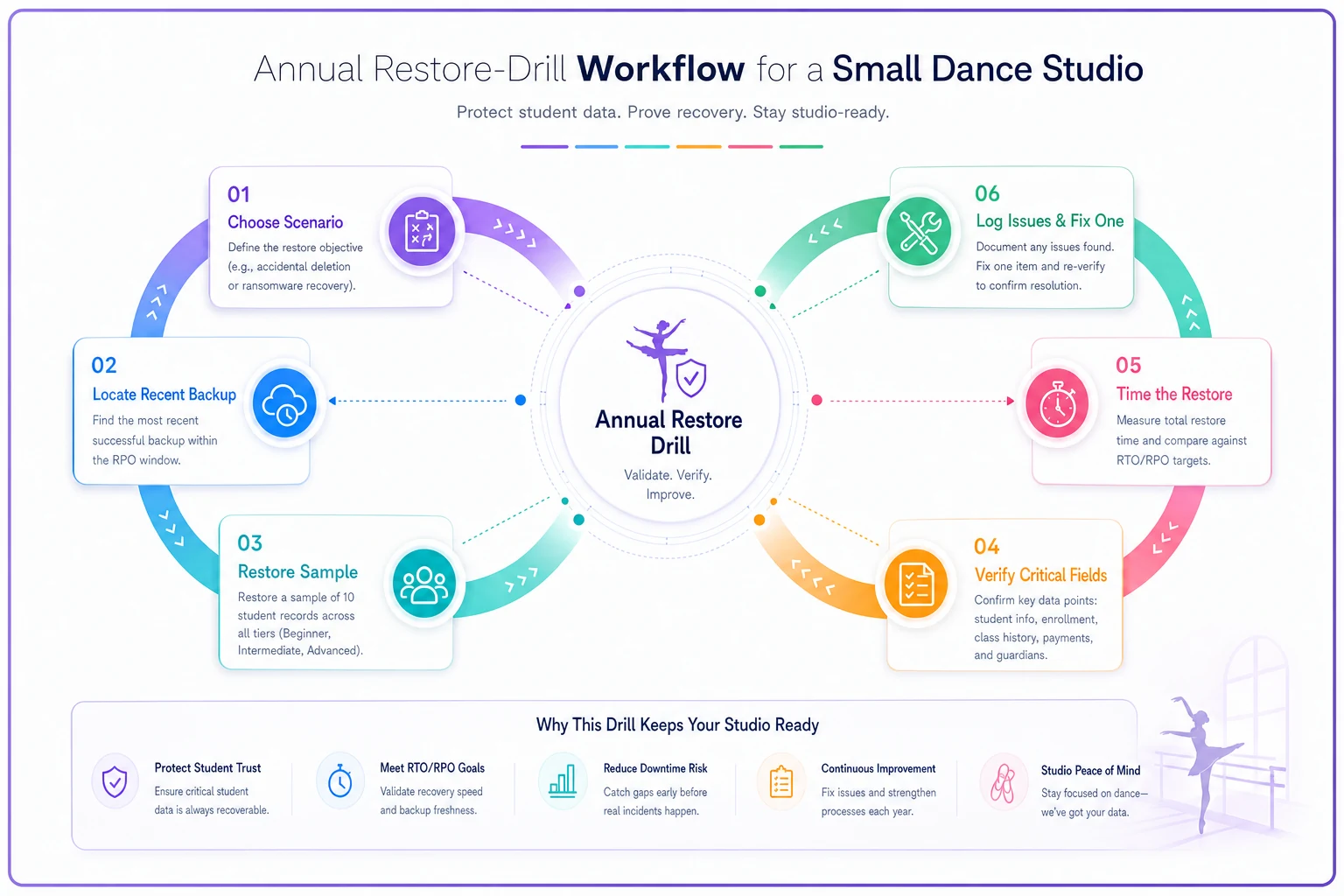
This diagram shows the main steps and decision points in the restore-drill workflow.
The first drill almost always fails in some small way. That's the point. Better to find out the allergy field doesn't export on a quiet Tuesday than during an enrollment emergency.
The attestation you can actually hand to someone
An attestation is just a signed, dated statement that says "here's how we protect records, and here's proof we tested it." Parents, landlords, insurers, and franchise HQs increasingly ask for something like this. Having a one-pager ready makes you look far more professional than scrambling an email together.
Keep it to one page. Something like:
---
Student-Record Backup & Retention Attestation
[Studio Name] — Prepared by [Owner Name] — Date: [___]
We maintain a tiered backup and retention policy for student records. Key commitments:
-
Critical records (medical alerts, emergency contacts, custody notes) are backed up daily, with a maximum data-loss window (RPO) of 24 hours and a restore target (RTO) of 24 hours.
-
Financial, attendance, and consent records are backed up daily, retained for [7 years / per local requirement], with a restore target of 3 business days.
-
Backups are stored in three copies across two storage types, including one off-site copy controlled directly by the studio.
-
We conduct an annual restore drill to verify records can actually be recovered. Most recent drill: [date]. Result: [pass / pass with noted fixes].
-
Access to critical records is limited to [roles].
Signed: Date: __
---
One page. It's not legally bulletproof language — it's an honest operational statement, which is exactly what most people asking actually want. The signed drill date is the part that carries weight, because it proves the policy is real and not just words on a document nobody has touched since it was written.
Retention: how long to keep, and when to delete
Backing things up forever is its own risk. The longer you hold a child's medical notes and personal data, the bigger your exposure if something leaks. Retention isn't just "keep everything" — it's "keep what you need for as long as you need it, then delete deliberately."
Rough defaults studios use (check your local rules, which override these):
-
Financial/payment records 7 years — tax and dispute coverage.
-
Signed consents and waivers duration of enrollment plus a few years after departure.
-
Medical/allergy and custody info while enrolled; purge shortly after a student leaves, since there's no reason to hold a former student's medical data indefinitely.
-
Attendance/progress a few years, useful for alumni re-enrollment and progress history.
-
Marketing email lists until the person unsubscribes or goes cold.
The deletion side of retention is the piece studios ignore entirely. A former family's data sitting in your exports for a decade isn't an asset — it's a liability with no upside. Build a simple annual purge into the same week you run your restore drill. Delete what's aged out, note that you did it.
When a lean policy is enough — and when it isn't
This minimal approach makes sense when: you're a single or two-location studio, your records live mostly in one management platform, and you can realistically handle a one-to-three day restore without catastrophe. For most studios, that's the honest reality, and a heavier policy would just gather dust.
This is not enough when: you're running multiple locations under a franchise or shared brand, you store a lot of video and media tied to minors, or you've had an actual data incident before. At that point you need tighter RPO/RTO targets, more frequent drills, and probably an outside opinion. The structure above still works as your foundation — you just tighten the numbers and run the drill twice a year.
Who should skip the fancy version entirely: a brand-new studio with 30 students and everything in one platform doesn't need a three-tier matrix on day one. Start with "export critical records monthly to a drive I own, test it once." You can grow into the rest.
A quick real scenario
A two-location studio with around 400 active students ran their first restore drill reluctantly — the owner was sure it'd be fine. They timed themselves locating the last export: 40 minutes, because nobody remembered which cloud folder it was in. Then the CSV re-import failed because the medical-alert field had never been included in the export template in the first place. Roughly 400 students' allergy and emergency notes existed only inside the live platform, with zero backup copy.
They'd have had no idea until the exact moment they needed it most.
The fix took an afternoon: add the critical fields to the export template, set a monthly reminder, and move the export folder somewhere both owners could find. The second drill the following year took about 50 minutes start to finish and passed cleanly. Nothing dramatic — just the difference between believing you have backups and knowing you do.
The one thing to do this week
If this whole post feels like a lot, do just one thing before you close the tab: export your critical records — the medical alerts, emergency contacts, and signed consents — to a folder you personally control, and confirm the file actually opens and contains those fields.
That single export, done today, protects you more than any policy document written and never tested. Everything else — the tiers, the RTO/RPO targets, the annual drill, the attestation — is just making that one habit reliable and provable. Start small, test it once, and you'll already be ahead of most studios that still believe "it's all in the cloud."
Start small, test it once, and you'll already be ahead of most studios that still believe "it's all in the cloud."
Ready to elevate your studio operations?
Join 500+ studios using Movioly to save time, reduce admin workload, and enhance student experiences.