


Most studio owners don't have an automation problem. They have a sequencing problem. They automate the loudest complaint first — usually whatever generated the last angry parent email — instead of the process that's actually draining hours or leaking revenue. Six months later they're stuck with a tangle of half-working Zapier flows, three tools that don't talk to each other, and a front-desk person who now spends more time fixing the automation than they used to spend doing the task by hand.
That's automation debt. And it's sneaky, because every individual decision felt reasonable at the time.
A real dance studio automation strategy isn't a list of things to automate. It's a lifecycle — idea, pilot, scale, monitor — with checkpoints that force you to prove something is worth automating before you build it, and fallbacks that keep a human in the loop when the automation inevitably hits an edge case. Studios that skip these gates don't fail because they picked the wrong software. They fail because they never defined what "working" meant, so they had no way to tell when it stopped working.
Here's how the whole system holds together — and where it breaks.
Why studios accumulate automation debt
The pattern is almost always the same. A studio hits a growth stage where the owner is doing too much manually. Enrollment jumps from 120 to 200 students, and suddenly the manual reminder texts, the spreadsheet for tuition, the copy-paste welcome emails — all of it starts cracking. So the owner reacts. They automate the welcome sequence one weekend, wire up a payment reminder the next, bolt on a chatbot because a competitor has one.
None of those pieces were designed to work together. That's the root issue.
In real operations, fragile automation usually shows up like this: the payment reminder fires, but it doesn't know the family already paid through a different method, so a paying customer gets a "you're overdue" text. Now the front desk is doing damage control on an automation that was supposed to save time. Multiply that across a few flows and you've built a system that generates its own busywork.
The deeper problem is that automation amplifies whatever process you feed it. If your underlying workflow is messy — inconsistent class codes, families entered twice, a placement policy nobody follows the same way — automating it just makes the mess happen faster and at scale. You can't automate your way out of an undefined process. You'll only industrialize the chaos.
So the first rule of any automation lifecycle: the process has to work manually, consistently, before it earns the right to be automated.
The four stages, and the gate between each
Think of automation as moving through four stages, with a decision gate you have to pass to advance. The gates are the whole point. Skipping them is how debt accumulates.
Eliminate scheduling headaches and missed payments.
Movioly streamlines booking, confirming, and managing every class with ease.
- Unified class and instructor scheduling
- Automated student notifications
- Integrated payment tracking
No credit card required
| Stage | Question you're answering | Gate to pass before advancing |
|---|---|---|
| Idea | Is this task frequent, rule-based, and painful enough to matter? | Does it pass a rough ROI estimate? |
| Pilot | Does automating it actually work with real data and real edge cases? | Did it hit the success metric over 3–4 weeks without creating new work? |
| Scale | Can this run across all classes/families/locations reliably? | Are fallbacks and monitoring in place? |
| Monitor | Is it still working, or has it quietly drifted? | Review at set intervals — kill or fix if it fails. |
Most studios operate as if there are only two stages: "I have an idea" and "I built it." Everything painful lives in the gaps they skipped.
Stage 1 — Idea: the frequency-and-rules filter
Not every annoying task should be automated. The good candidates share three traits: they happen often, they follow clear rules, and the cost of a small mistake is low or recoverable.
A task that happens twice a year isn't worth automating — you'll spend more time building and maintaining it than doing it by hand. A task that requires judgment on every instance (like handling a parent's complaint about placement) shouldn't be fully automated, because the "rules" are actually human discretion in disguise.
The sweet spot for most studios:
-
Payment retries and dunning on failed cards
-
Trial-to-enrollment follow-up sequences
-
Attendance logging and absence flags
-
Class waitlist promotions
-
Recital and event reminder cadences
-
Standard refund and credit processing for clear-cut cases
These are all high-frequency, rule-driven, and mostly reversible. Compare that to something like "deciding which student moves up a level" — high stakes, judgment-heavy, and a wrong call damages trust. That belongs to a human, maybe with automation supporting the decision (pulling attendance and progress data), never making it.
The ROI gate — the math most owners skip
Before you build anything, run a rough estimate. Not a spreadsheet with false precision — a back-of-napkin sanity check.
Simple version:
-
Time saved per week — how many hours does this task actually eat? Be honest, and count the fixing-mistakes time too, not just the doing time.
-
Value of that time — what's the loaded hourly cost of whoever does it? For front-desk admin, figure roughly $18–$25/hour all-in.
-
Revenue protected or recovered — does the automation stop leakage? A dunning flow that recovers even a handful of failed payments a month is worth real money.
-
Build + maintenance cost — your time or a specialist's to set it up, plus the ongoing "this broke again" tax.
-
Payback period — how many weeks until saved time and recovered revenue exceed setup cost?
A quick example. Say your front desk spends about 4 hours a week manually chasing failed payments and sending overdue reminders. At roughly $22/hour, that's around $88/week, or close to $4,500 a year. If a retention-focused dunning workflow also recovers, conservatively, two or three memberships a year that would've silently churned, you're well past the cost of setting it up. That passes the gate easily.
Flip it. A custom automation to handle your twice-yearly costume ordering, which takes maybe 6 hours total and involves negotiating with a vendor? Twelve hours a year saved, minus a build that'll take longer than that and break every time the vendor changes their form. Fails the gate. Do it by hand.
If a task can't clear a payback period of roughly a season or two, it doesn't advance. That single discipline prevents most automation debt before it starts.
Stage 2 — The pilot: prove it small before you trust it big
This is the stage almost everyone skips, and it's the most important one. A pilot means running the automation on a limited slice — one class, one location, one segment of families — with a human watching every output before it goes live to the customer.
Going straight to "fully automated for everyone" means you find out about edge cases from angry parents instead of from a controlled test.
A basic pilot template:
-
Define the success metric up front. Not "it works" — something measurable. "Cuts reminder-sending time by at least half with zero incorrect messages sent over 3 weeks."
-
Pick a narrow scope. One age group or one weekday's classes. Small enough that if it breaks, you can fix it by hand in ten minutes.
-
Run in shadow mode first. Let the automation generate the output — the email, the text, the flag — but a human reviews and sends it. You're checking whether it would have made mistakes, without exposing families to them.
-
Log every edge case. Duplicate families, mid-month enrollments, siblings on one account, families who paid offline. Every one you catch now is a disaster you avoid at scale.
-
Set a kill condition. Decide in advance what failure looks like. "If it sends more than one wrong message, we pause and fix." Without this, you'll rationalize keeping a broken flow because you already built it.
Run the pilot for three to four weeks. That's usually long enough to hit the messy real-world cases — the mid-cycle sign-up, the family that switches classes, the payment that clears late.
If the automation passes its metric without generating cleanup work, it advances. If passing the metric required a human babysitting it constantly, it hasn't actually saved anything — it's just moved the work around. That's a fail, even if the emails looked perfect.
Studios that get the refund and credit side right tend to treat it exactly this way — piloting the clear-cut cases first and leaving the judgment calls to staff. If that's your next target, the mechanics in this breakdown of automating refunds, credits and gift-card flows map cleanly onto the pilot approach.
Here's a simple visual of the pilot workflow.
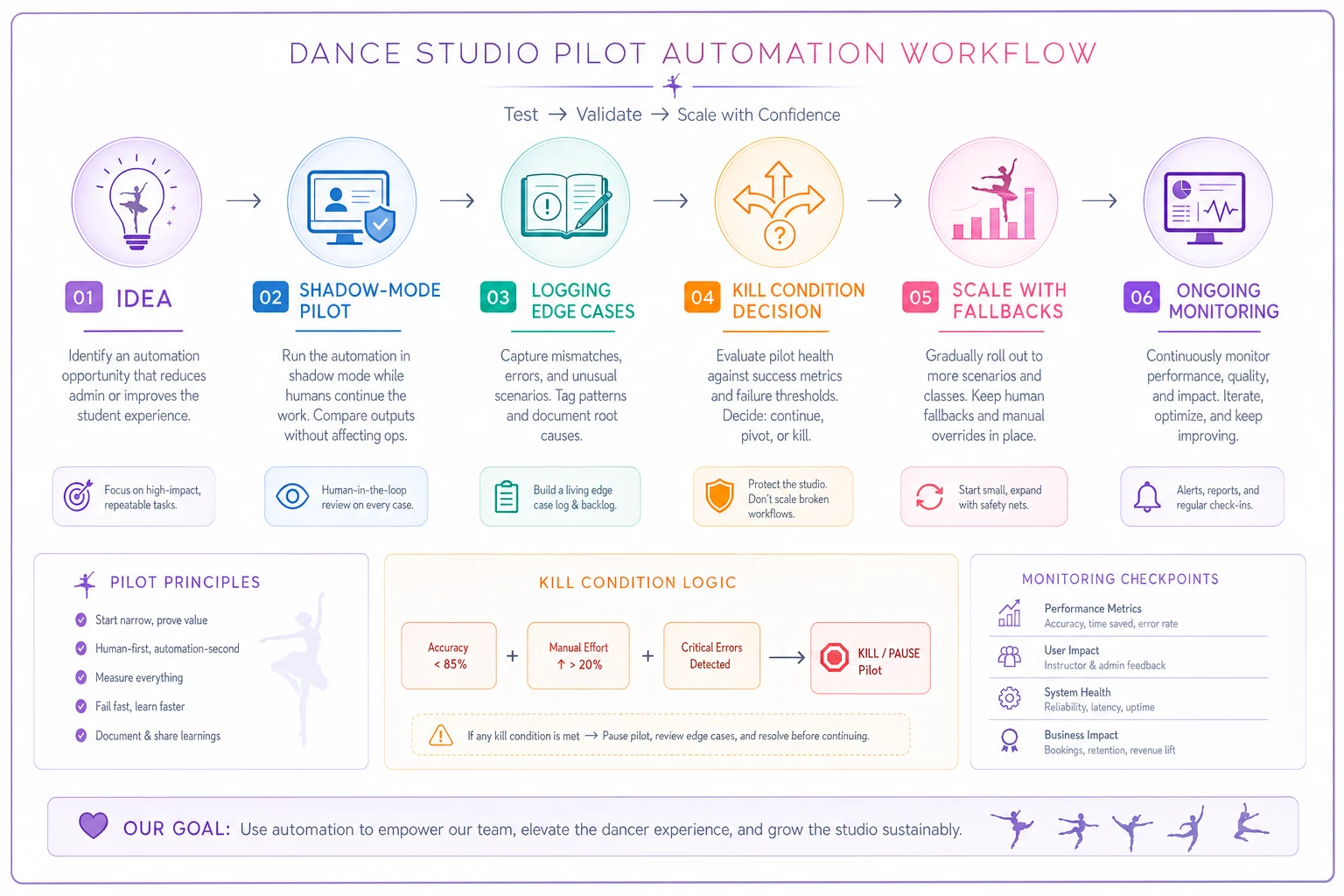
Keep the pilot small, measurable, and reversible. If it needs constant human intervention it's not a win yet.
Stage 3 — Scale: don't roll out without fallbacks
Passing a pilot earns you the right to scale — but scaling isn't just flipping the switch to "everyone." What breaks at scale is almost never the happy path. It's the volume of edge cases you didn't hit in a small pilot but absolutely will hit across 250 families.
Non-negotiable before scaling: every automated flow needs a human handoff path.
A fallback is the escape hatch for when the automation encounters something it can't handle correctly. The failure mode you're preventing is the automation confidently doing the wrong thing to a customer. A good fallback catches uncertainty and routes it to a person before it reaches the family.
What this looks like in practice:
-
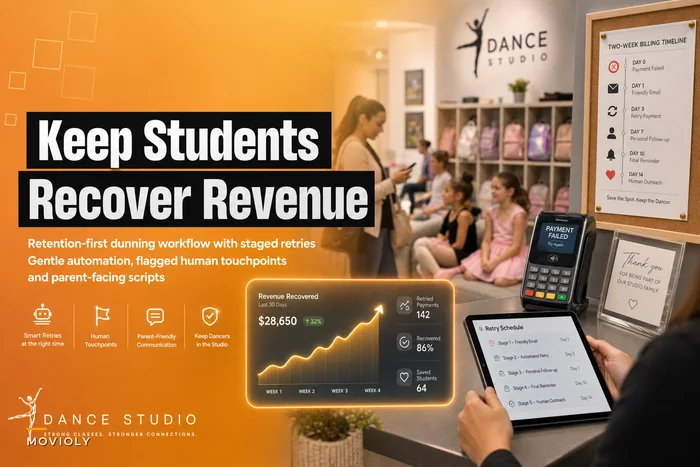
Failed payment automation hits a card that's declined three times → instead of endlessly retrying and spamming the parent, it flags the account for a human to make a personal call. The financial mechanics of doing this without losing the student are worth getting right — this retention-first dunning workflow is built around exactly that handoff logic.
-
Trial follow-up sequence gets a reply from a parent that isn't a simple yes/no → the automation stops sending scripted messages and hands the conversation to staff. Nothing kills a warm lead faster than an obviously robotic reply to a real question.
-
Attendance flag detects a student who's missed three classes → it doesn't auto-send a "we miss you" blast; it surfaces the student on a list for the instructor to reach out personally, because the reason for the absence changes the right response entirely.
The pattern: automate the routine 80%, route the messy 20% to a human. Full automation of a process that has real judgment in the tail is where fragile workflows come from. The studios with the cleanest operations aren't the ones who automated the most — they're the ones who drew that 80/20 line correctly.
Automate the routine 80%, and design clear handoffs for the exceptional 20%.
Scaling also means one operational discipline most owners underrate: consistent input data. If your class codes, family records, and enrollment statuses aren't clean, the automation scales the inconsistency. Spend a day standardizing before you scale, not after.
Stage 4 — Monitor: the stage nobody schedules
Automations don't stay working. This is the part that surprises people. Your class schedule changes, your payment processor updates something, a family setup you never anticipated shows up, and a flow that ran perfectly for four months quietly starts misfiring. Nobody notices until a parent complains, because "it's automated" got mentally filed under "handled forever."
Monitoring means setting an actual recurring review — monthly is fine for most studios — where you check each live automation against a couple of simple questions:
-
Is it still hitting the metric it passed the pilot on?
-
How many times did it route to the human fallback this month, and is that number climbing?
-
Are staff quietly working around it?
That last one is the most useful signal you have. Staff workarounds are automation debt made visible. If the front desk has started doing something by hand "because the automation gets it wrong," the automation is already dead — it just hasn't been buried. When you find one, you either fix the flow or kill it. Never leave a zombie automation running that everyone has quietly stopped trusting.
Rising fallback volume is the early warning. If a flow that used to hand off 5% of cases is now handing off 20%, something in your business changed and the automation's rules didn't keep up. That's your cue to revisit, not to keep pushing volume through it.
When automation makes sense — and when it doesn't
When it actually makes sense:
-
The task is high-frequency and rule-based
-
Mistakes are recoverable, not reputation-ending
-
You've run it manually long enough to know all the edge cases
-
It passes the ROI gate with a payback of a season or two
-
You have a clear human fallback for the messy cases
When it's a bad idea:
-
The task happens rarely (you'll never earn back the build cost)
-
Every instance requires human judgment
-
Your underlying process is still inconsistent or undefined
-
A single wrong output damages trust with a family
-
You can't articulate what "working" means in measurable terms
Who should NOT be automating yet: The studio still figuring out its core processes. If your placement policy, your class structure, or your enrollment flow changes every term because you're still growing into your model, automating now locks in a moving target. Get the process stable and repeatable by hand first. Automation is a multiplier — you want to multiply something that works.
Get the process stable and repeatable by hand first. Automation is a multiplier — you want to multiply something that works.
A real scenario
Consider a mid-sized studio, around 230 students across two locations, run by an owner who was drowning in payment admin and trial follow-ups. Her instinct was to automate everything at once — she'd watched a webinar and came out wanting six new flows by end of month.
Instead she sequenced it. She started with the single flow that passed the ROI gate most clearly: failed-payment handling, which was eating roughly 3–4 hours a week and quietly costing her a couple of lost families each season. She ran it as a pilot on one location for a month in shadow mode, caught two ugly edge cases (siblings billed on one card, a family who always paid late but reliably), built fallbacks for both, then scaled to both locations.
Only after that ran clean for a few weeks did she add the trial follow-up sequence, same process. Total time to two solid, trusted automations: about two and a half months. Slower than she wanted. But a year later she still had exactly two automations — both working, both monitored, zero cleanup tax. The version of her who built six flows in one month would've spent that year firefighting.
The saved admin time landed somewhere around 6–7 hours a week once both were stable, and the payment recovery paid for the whole effort several times over. But the real win was invisible: no automation debt. Nothing quietly rotting in the background.
Bringing it together
The temptation with a dance studio automation strategy is to measure success by how much you've automated. That's the wrong scoreboard. The studios with the healthiest operations often automate less than their peers — but everything they automate is proven, monitored, and has a human escape hatch.
The lifecycle exists to slow you down at exactly the right moments. The ROI gate stops you from building things that never pay off. The pilot stops you from exposing families to your edge cases. The fallback keeps a person in the loop where judgment matters. Monitoring stops your automations from decaying into liabilities you've forgotten about.
Do those four things and you build a system that gets stronger as you grow. Skip them and you build a pile of fragile flows that each demand maintenance until you're spending more time managing your automation than you ever spent on the work itself. Pick one process, run it through the full lifecycle, and let the discipline — not the tool count — be the thing you're proud of.
Ready to elevate your studio operations?
Join 500+ studios using Movioly to save time, reduce admin workload, and enhance student experiences.